SYMPTOM:
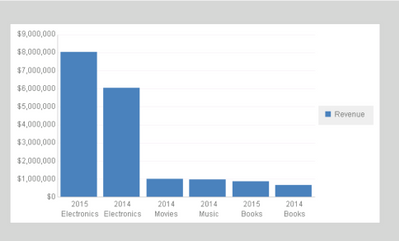
The axis font size of a RS Document increases disproportionately when opening the document with Android Mobile App 10.6, as shown below:
RS Document in Strategy Web 10.6
RS Document in Mobile App 10

STEPS TO REPRODUCE:
Follow the steps below to reproduce the issue in Strategy Tutorial project after the mobile configuration for Android phone\tablet has been already completed.
1. In Strategy Web 10.6, create a new RS Document > Blank Dashboard.
2. Insert as dataset a report with Year and Category attributes, and Revenue metric.
3. Insert a grid and add Year and Category to rows and Revenue to column.
4. Change View Mode to graph and choose Pareto graph.
6. Run RS Document in Presentation mode.
7. Save and close.
8. Open RS Document with Android Mobile App 10.6 to experience the issue.
CAUSE:
This is a know issue in Strategy Mobile App 10.6 and its being evaluated.
ACTION:
Currently this issue is still being reviewed for feasibility by our Technology team and it is not scoped for any upcoming scheduled Strategy release.
WORKAROUND:
1. Run the document as Editable mode on Web.
2. RMC on the graph and choose Format...
3. Go to Advanced tab and set "Font and line resizing" to "Relative". Resave the document.
KB319952
