EducationSoftwareStrategy.com
StrategyCommunity

Knowledge Base

Product

Community

Knowledge Base

TopicsBrowse ArticlesDeveloper Zone

Product

Download SoftwareProduct DocumentationSecurity Hub

Education

Tutorial VideosSolution GalleryEducation courses

Community

GuidelinesGrandmastersEvents
x_social-icon_white.svglinkedin_social-icon_white.svg
Strategy logoCommunity

© Strategy Inc. All Rights Reserved.

LegalTerms of UsePrivacy Policy
  1. Home
  2. Topics

KB32002: The prompt wildcard of dynamic text for graph titles and labels cannot be retained on the graph report when an attribute is removed from the report in MicroStrategy Developer 9.x


Stefan Zepeda

Salesforce Solutions Architect • Strategy


This technical note describes an issue that occurs when an attribute is removed from the report, where the prompt wildcard of dynamic text for graph titles and labels cannot be retained on the graph report

SYMPTOM:
In Strategy Developer 9.x, when an attribute is removed from the report, the prompt wildcard of dynamic text for graph titles and labels cannot be retained on the graph report.
Refer to the following Strategy Technote for more details on wildcards in Dynamic text for graph titles and labels:
 
KB11907: Placeholders that can be used as wildcards for graph titles and labels in MicroStrategy Developer 9.x
 
STEPS TO REPRODUCE:
Follow the steps below to reproduce this issue in the Strategy Tutorial project:
  • In Strategy Developer, create a report, place the attribute Year and Quarter on the row, the metric Cost on the column. Add a prompt which qualifies on Year attribute element list to the report.
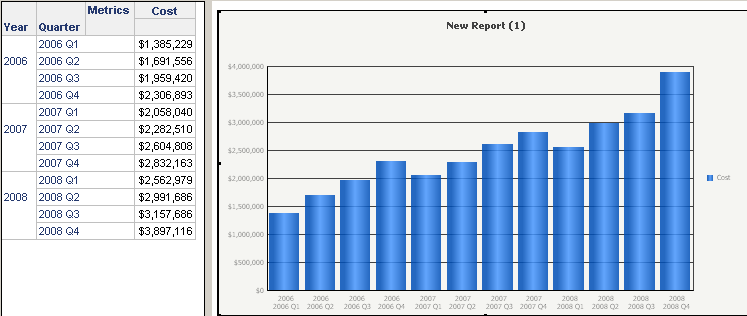
  • Run the report created at step1 in `Grid Graph View` (select all elements as prompt answer), as shown below:
     
ka02R000000kUryQAE_0EM440000002EFM.png
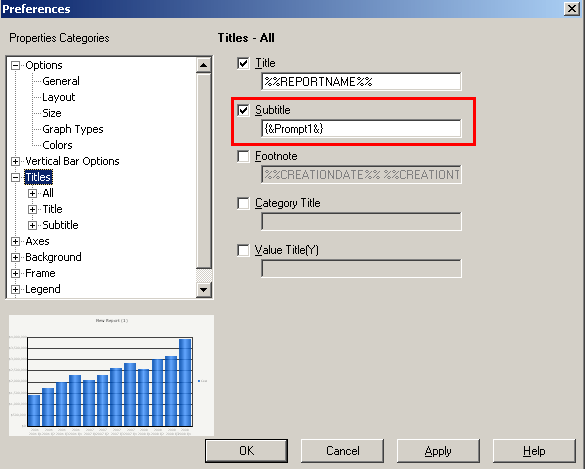
  • Go to the menu option Graph -> Titles and Labels, enable the option `Subtitle`, set it as `{&Prompt1&}`, as shown below:
     
ka02R000000kUryQAE_0EM440000002EFf.png
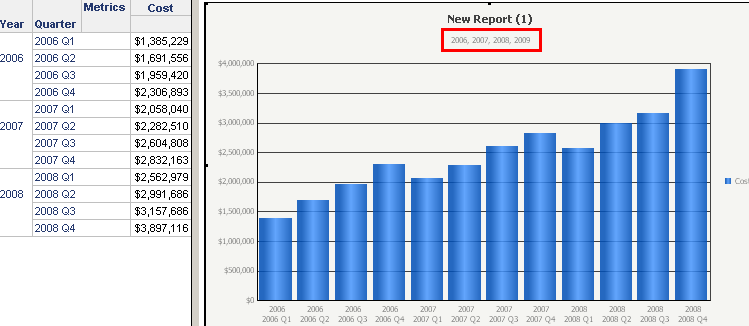
  • Click OK, the prompt answer is displayed under the title of the graph report, as shown below:
     
ka02R000000kUryQAE_0EM440000002EFb.png
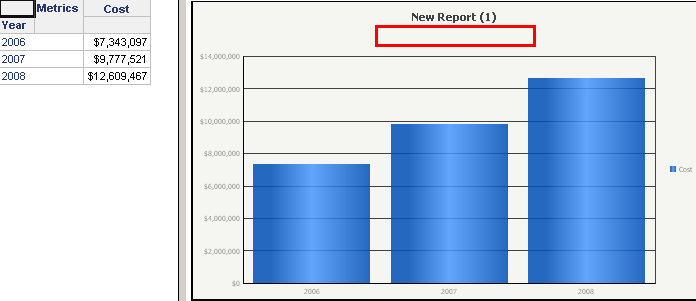
  • On the grid report, right click the attribute Quarter, select `Remove from Report` to delete Quarter from the report. The report is re-executed, but the prompt answer is disappeared from the graph report, as shown below:
     
ka02R000000kUryQAE_0EM440000002EFd.png

CAUSE:
This is a known issue in Strategy Developer 9.x.
 
ACTION:
Strategy is investigating this issue and will continue posting updates as soon as they become available.
 
WORKAROUND:
Re-prompt the report, the prompt answer can be displayed back under the title of the graph report.


Comment

0 comments

Details

Knowledge Article

Published:

June 12, 2017

Last Updated:

March 31, 2019