SYMPTOM:
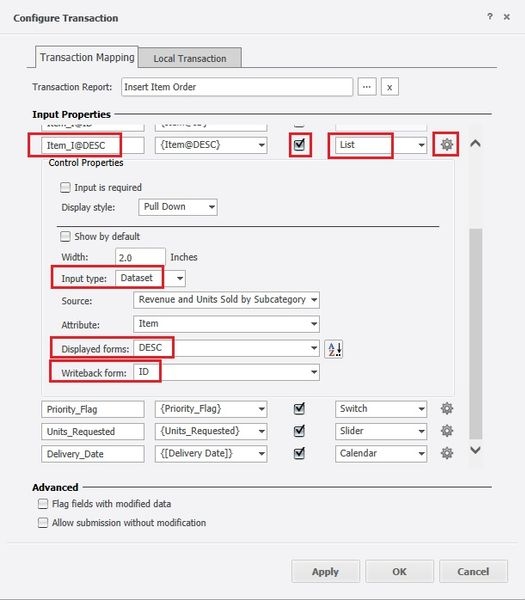
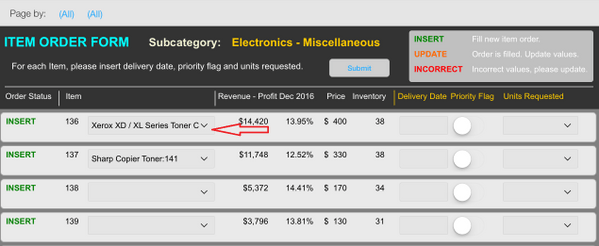
In a Transaction Services document, users can configure a textbox to use one attribute form as the Display Form and a different one as the Writeback Form. This means that while the user sees the attribute form set as Displayed Form, behind the scenes, the transaction will use the Writeback form to submit the data. In Strategy Web 10.4, presentation mode, this configuration seems to work as expected. However in Strategy Mobile 10.4, when using a list style, upon changing the initial selection to a different selection, the form displayed becomes the Writeback form instead, as shown below:

Notice how the first row shows "143", the ID form, and not "Panasonic Compact Plain Paper Fax", the description form.
STEPS TO REPRODUCE:
Follow these steps to reproduce the issue in a Strategy Tutorial Project.

CAUSE:
This is working as designed in Strategy Mobile 10.4. The transaction configuration has a setting called "Show by default." When this setting is not enabled, the initial display in Strategy Mobile 10.4 will persists as per the configuration, but once it has been modified from the initial display, it is designed to show the "Writeback" Form instead, in this case, the ID form, causing the confusion.
ACTION:
Edit the transaction in Strategy Web 10.4 and enable "Show by default", as shown below:

The Desc form of the attribute should now persist in Strategy Mobile 10.4, as shown below:
KB320035
