The properties of the text box used to enter the search criteria in an element prompt can be modified using the Strategy SDK.
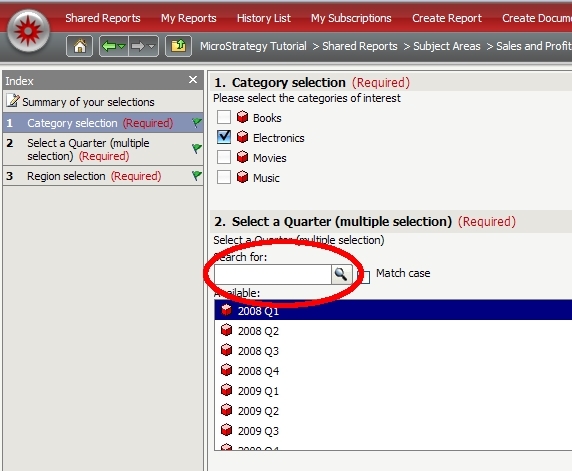
The HTML generated to render the search text box by default is the following:
<input
type="text"
size=""
id="id_mstr84_txt"
style="background-color: rgb(255, 255, 255);"
name="id_mstr84_txt"
onkeypress="return mstr.behaviors.TextBoxWithIcon.onkeypress(arguments, self, 'id_mstr84', this.value)"
onclick="if (mstr.utils.ISW3C) {this.focus();}"
maxlength=""/>
Customer's might want to customize the behaviour of the text box to add new JavaScript functions or add custom parameters to the HTML <input> tag.
The Client Side layout information for the search text box is stored under:
WEB-INF\xml\layoutsCS\mstr\layouts\TextBoxWithIcon.xml
The input tag parameters can be modified there to accomplish the desired behaviour.
Sample
Adding onMouseOver="javascript:alert('Mouse Over');" to the input definition
<input maxlength="{@maxlength}"
onclick="if (mstr.utils.ISW3C) {this.focus();}"
onkeypress="return mstr.behaviors.TextBoxWithIcon.onkeypress(arguments, self, '{@id}', this.value)"
name="{@id}_txt"
style="{@cssText}"
id="{@id}_txt"
size="{@size}"
type="{@inputType}"
onMouseOver="javascript:alert('Mouse Over');">
</input>
Will generate the following HTML when rendering the input text box
<input
type="text"
onmouseover="javascript:alert('Mouse Over');"
size=""
id="id_mstr84_txt"
style="background-color: rgb(255, 255, 255);"
name="id_mstr84_txt"
onkeypress="return mstr.behaviors.TextBoxWithIcon.onkeypress(arguments, self, 'id_mstr84', this.value)"
onclick="if (mstr.utils.ISW3C) {this.focus();}"
maxlength=""/>
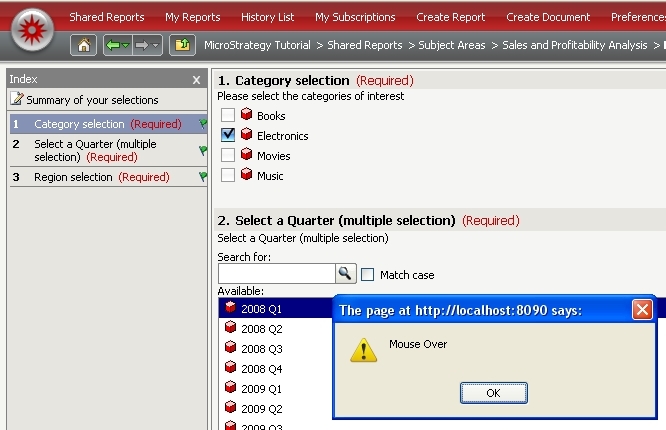
And will pop up and alert box when the mouse is placed on top of the text box
CUSTOMIZATION WARNING
This customization is provided as a convenience to Strategy users and is only directly applicable to the version stated. While this code may apply to other releases directly, Strategy Technical Support makes no guarantees that the code provided will apply to any future or previous builds. In the event of a code change in future builds, Strategy Technical Support makes no guarantee that an updated version of this particular customization will be provided. In the event of a code change in future builds, Strategy may not be able to provide additional code on this matter even though this customization is provided at this time for this specific build. For enhancements to this customization or to incorporate similar functionality into other versions, contact your Account Executive to inquire about Strategy consulting assistance.
