EducationSoftwareStrategy.com
StrategyCommunity

Knowledge Base

Product

Community

Knowledge Base

TopicsBrowse ArticlesDeveloper Zone

Product

Download SoftwareProduct DocumentationSecurity Hub

Education

Tutorial VideosSolution GalleryEducation courses

Community

GuidelinesGrandmastersEvents
x_social-icon_white.svglinkedin_social-icon_white.svg
Strategy logoCommunity

© Strategy Inc. All Rights Reserved.

LegalTerms of UsePrivacy Policy
  1. Home
  2. Topics

KB320105: The drill option is greyed out in VI for a grid visualization if it is an attribute that is associated with a custom drill map


Community Admin

• Strategy


SUMMARY:
This issue has been classified as a defect by Strategy. The impact is from the Strategy Web 10.x product when trying to drill on a VI dashboard if the attribute being used has a custom drill map defined. A solution/code fix for this issue is not available in current releases but is being reviewed for a future Strategy release.
SYMPTOM:
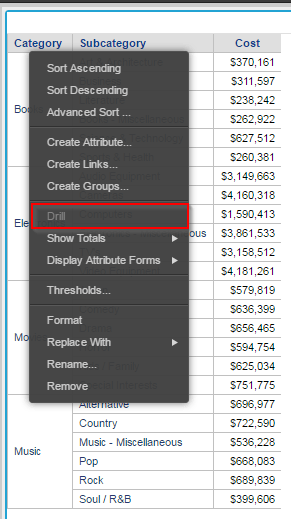
An attribute can have a custom drill map; however, if this is used, then the drill option in a Visual Insight dashboard will be greyed out and drilling will not be possible.
ka04W000000OePQQA0_0EM4400000025Nr.jpeg

STEPS TO REPRODUCE:

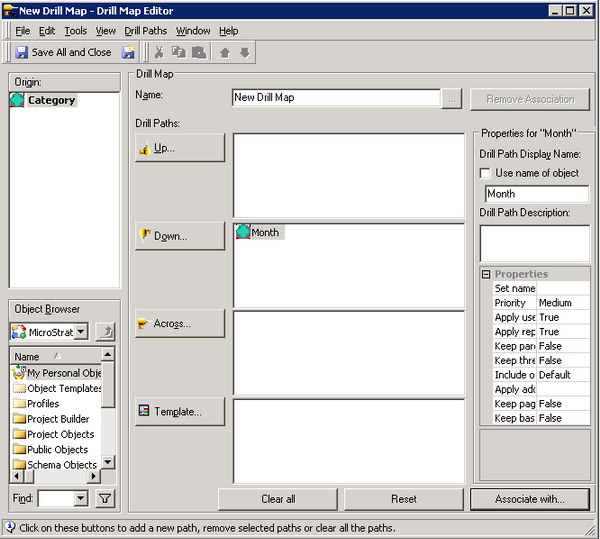
  1. In Strategy Developer, create a drill map and associate it with a schema attribute, in this case, the drill map will drill down to the Month attribute and is associated with the Category attribute.


ka04W000000OePQQA0_0EM4400000025Nq.jpeg


  1. Create a report using Category, Subcategory and Cost.
  2. Create a VI dashboard based on this report.
  3. Right click on Category and notice the Drill option is greyed out.

CAUSE:
This is a known issue in Strategy Web 10.x.
ACTION:
In 10.7, Drill option is available and it allows the users to drill to objects that are common in both the drill map and the dataset,


Comment

0 comments

Details

Knowledge Article

Published:

June 9, 2017

Last Updated:

June 9, 2017