EducationSoftwareStrategy.com
StrategyCommunity

Knowledge Base

Product

Community

Knowledge Base

TopicsBrowse ArticlesDeveloper Zone

Product

Download SoftwareProduct DocumentationSecurity Hub

Education

Tutorial VideosSolution GalleryEducation courses

Community

GuidelinesGrandmastersEvents
x_social-icon_white.svglinkedin_social-icon_white.svg
Strategy logoCommunity

© Strategy Inc. All Rights Reserved.

LegalTerms of UsePrivacy Policy
  1. Home
  2. Topics

KB32013: Data discrepancy in an Intelligent Cube when normalizing lookup data without filtering in a case insensitive data warehouse in MicroStrategy OLAP Services 9.x-10.x


Community Admin

• Strategy


SYMPTOM
An Intelligent Cube report is created in Strategy 9.0.1 or later, with the following characteristics:

  • One or more attributes uses a text column as its ID form.
  • The column contains case-sensitive data, e.g., 'Abc' and 'abc' represent distinct rows.
  • The warehouse database's collation, or the collation on the table, is case insensitive, e.g. SQL_Latin1_General_CP1_CI_AS in Microsoft SQL Server (where CI stands for case insensitive).
  • The Intelligent Cube is configured to normalize data using the "Normalize Intelligent Cube data basing on dimensions with NO attribute lookup filtering" option of the "Data population for Intelligent Cube" VLDB property.

A view report executed against this Intelligent Cube returns different results from a standard report with the same template that runs as SQL on the database. The view report's metric values are smaller, indicating that some fact rows from the database are not considered.


This layer…is overwritten by these layers…metric object - headersaxis headers, grid unit headers, all metrics headers, report metric headers, column subtotal headers, row subtotal headersmetric object - valuesaxis values, grid unit values, all metrics values, report metric values column subtotal values row subtotal valuesaxis - headersgrid unit headers, all metrics headers, report metric headers, column subtotal headers, row subtotal headersaxis - valuesgrid unit values, all metrics values, report metric values column subtotal values row subtotal valuesgrid unit - headersall metrics headers, report metric headers, column subtotal headers, row subtotal headersgrid unit - valuesall metrics values, report metric values column subtotal values row subtotal valuesall metrics - headersreport metric headers, column subtotal headersall metrics - valuesreport metric values column subtotal valuesreport metricbanding, column subtotals, row subtotals, thresholdbandingcolumn subtotals, row subtotals, thresholdcolumn subtotalsrow subtotals, thresholdrow subtotalsthresholdreport bordernonethresholdnoneLevelWhat is it?set it here…Notesmetricspecifies a format for a metric regardless of the report it is on.set in the metric editor."all metrics" and "axis" formatting must be set at defaultaxisaffects all units of the axis.format --> rows and columnsgrid unit formatting must be set to defaultgrid unitformatting of individual report items such as attributesgrid units are listed on the Format menu all metricformats the data zone (where the metric values are displayed)format --> all metrics report metricformats an individual metric on a particular reportindividual metrics are listed in the format menu bandingrow or column grouping by colorgrid --> options column subtotalscan be applied either as "zone" or "grid unit" formatting. "grid unit" formatting moves with the subtotals while "zone" is based on location.to set "zone" formatting, select format -->columns -->subtotal headers or values. to set "grid unit" formatting, select the grid unit from the format menu.row subtotalscan be applied either as "zone" or "grid unit" formatting. "grid unit" formatting moves with the subtotals while "zone" is based on location.to set "zone" formatting, select format --> rows -->subtotal headers or values. to set "grid unit" formatting, select the ggrid unit from the format menu.overwrites column subtotal formatting where they intersect with row subtotal formattingreport bordercreates a border around the whole reportright-click on the report (but NOT a report object) then select formatting --> report borders thresholdchanges formatting based on returned data.grid --> Thresholdsoverwrites all other layers.Month_IDLast_12_Month200612200612200612200611200612200610200612200609200612200608200612200607200612200606200612200605200612200604200612200603200612200602200612200601200611200611200611200610200611200609200611200608200611200607200611200606200611200605200611200604200611200603200611200602200611200601200611200512......cust_nocust_namecust_ordercust_typeA01John Doe22A02Jane Doe32A02Jane Doe72A03Joe Doe63 Joe Doe33A04Jenny Doe54cust_namemy_valuesJane Doe10Jenny Doe0Joe Doe6John Doe2Conditional primitiveDECODE statementA<BDecode(Sign(A-B), -1, 1, 0)A<=BDecode(Sign(A-B), 1, 0, 1)A>BDecode( Sign(A-B), 1, 1, 0 )A>=BDecode( Sign(A- B), -1, 0, 1 )A=BDecode( A, B, 1, 0 )A between B and CDecode( Sign(A-B), -1, 0, Decode(Sign(A-C), 1, 0, 1 ))A is nullDecode(A,null,1,0)A is not nullDecode(A,null,0,1)A in (B1,B2,...,Bn)Decode(A,B1,1,B2,1,...,Bn,1,0)

 
This layer…is overwritten by these layers…metric object - headersaxis headers, grid unit headers, all metrics headers, report metric headers, column subtotal headers, row subtotal headersmetric object - valuesaxis values, grid unit values, all metrics values, report metric values column subtotal values row subtotal valuesaxis - headersgrid unit headers, all metrics headers, report metric headers, column subtotal headers, row subtotal headersaxis - valuesgrid unit values, all metrics values, report metric values column subtotal values row subtotal valuesgrid unit - headersall metrics headers, report metric headers, column subtotal headers, row subtotal headersgrid unit - valuesall metrics values, report metric values column subtotal values row subtotal valuesall metrics - headersreport metric headers, column subtotal headersall metrics - valuesreport metric values column subtotal valuesreport metricbanding, column subtotals, row subtotals, thresholdbandingcolumn subtotals, row subtotals, thresholdcolumn subtotalsrow subtotals, thresholdrow subtotalsthresholdreport bordernonethresholdnoneLevelWhat is it?set it here…Notesmetricspecifies a format for a metric regardless of the report it is on.set in the metric editor."all metrics" and "axis" formatting must be set at defaultaxisaffects all units of the axis.format --> rows and columnsgrid unit formatting must be set to defaultgrid unitformatting of individual report items such as attributesgrid units are listed on the Format menu all metricformats the data zone (where the metric values are displayed)format --> all metrics report metricformats an individual metric on a particular reportindividual metrics are listed in the format menu bandingrow or column grouping by colorgrid --> options column subtotalscan be applied either as "zone" or "grid unit" formatting. "grid unit" formatting moves with the subtotals while "zone" is based on location.to set "zone" formatting, select format -->columns -->subtotal headers or values. to set "grid unit" formatting, select the grid unit from the format menu.row subtotalscan be applied either as "zone" or "grid unit" formatting. "grid unit" formatting moves with the subtotals while "zone" is based on location.to set "zone" formatting, select format --> rows -->subtotal headers or values. to set "grid unit" formatting, select the ggrid unit from the format menu.overwrites column subtotal formatting where they intersect with row subtotal formattingreport bordercreates a border around the whole reportright-click on the report (but NOT a report object) then select formatting --> report borders thresholdchanges formatting based on returned data.grid --> Thresholdsoverwrites all other layers.Month_IDLast_12_Month200612200612200612200611200612200610200612200609200612200608200612200607200612200606200612200605200612200604200612200603200612200602200612200601200611200611200611200610200611200609200611200608200611200607200611200606200611200605200611200604200611200603200611200602200611200601200611200512......cust_nocust_namecust_ordercust_typeA01John Doe22A02Jane Doe32A02Jane Doe72A03Joe Doe63 Joe Doe33A04Jenny Doe54cust_namemy_valuesJane Doe10Jenny Doe0Joe Doe6John Doe2Conditional primitiveDECODE statementA<BDecode(Sign(A-B), -1, 1, 0)A<=BDecode(Sign(A-B), 1, 0, 1)A>BDecode( Sign(A-B), 1, 1, 0 )A>=BDecode( Sign(A- B), -1, 0, 1 )A=BDecode( A, B, 1, 0 )A between B and CDecode( Sign(A-B), -1, 0, Decode(Sign(A-C), 1, 0, 1 ))A is nullDecode(A,null,1,0)A is not nullDecode(A,null,0,1)A in (B1,B2,...,Bn)Decode(A,B1,1,B2,1,...,Bn,1,0)

 
CAUSE
This issue occurs because of an interaction between data characteristics, database configuration and Strategy Analytical Engine processing.
 
The key element in this issue is that there is a conflict between the case-sensitive data stored in the affected attribute's ID column and the case-insensitive collation used by the database. This can be observed by executing SQL directly against the warehouse:


This layer…is overwritten by these layers…metric object - headersaxis headers, grid unit headers, all metrics headers, report metric headers, column subtotal headers, row subtotal headersmetric object - valuesaxis values, grid unit values, all metrics values, report metric values column subtotal values row subtotal valuesaxis - headersgrid unit headers, all metrics headers, report metric headers, column subtotal headers, row subtotal headersaxis - valuesgrid unit values, all metrics values, report metric values column subtotal values row subtotal valuesgrid unit - headersall metrics headers, report metric headers, column subtotal headers, row subtotal headersgrid unit - valuesall metrics values, report metric values column subtotal values row subtotal valuesall metrics - headersreport metric headers, column subtotal headersall metrics - valuesreport metric values column subtotal valuesreport metricbanding, column subtotals, row subtotals, thresholdbandingcolumn subtotals, row subtotals, thresholdcolumn subtotalsrow subtotals, thresholdrow subtotalsthresholdreport bordernonethresholdnoneLevelWhat is it?set it here…Notesmetricspecifies a format for a metric regardless of the report it is on.set in the metric editor."all metrics" and "axis" formatting must be set at defaultaxisaffects all units of the axis.format --> rows and columnsgrid unit formatting must be set to defaultgrid unitformatting of individual report items such as attributesgrid units are listed on the Format menu all metricformats the data zone (where the metric values are displayed)format --> all metrics report metricformats an individual metric on a particular reportindividual metrics are listed in the format menu bandingrow or column grouping by colorgrid --> options column subtotalscan be applied either as "zone" or "grid unit" formatting. "grid unit" formatting moves with the subtotals while "zone" is based on location.to set "zone" formatting, select format -->columns -->subtotal headers or values. to set "grid unit" formatting, select the grid unit from the format menu.row subtotalscan be applied either as "zone" or "grid unit" formatting. "grid unit" formatting moves with the subtotals while "zone" is based on location.to set "zone" formatting, select format --> rows -->subtotal headers or values. to set "grid unit" formatting, select the ggrid unit from the format menu.overwrites column subtotal formatting where they intersect with row subtotal formattingreport bordercreates a border around the whole reportright-click on the report (but NOT a report object) then select formatting --> report borders thresholdchanges formatting based on returned data.grid --> Thresholdsoverwrites all other layers.Month_IDLast_12_Month200612200612200612200611200612200610200612200609200612200608200612200607200612200606200612200605200612200604200612200603200612200602200612200601200611200611200611200610200611200609200611200608200611200607200611200606200611200605200611200604200611200603200611200602200611200601200611200512......cust_nocust_namecust_ordercust_typeA01John Doe22A02Jane Doe32A02Jane Doe72A03Joe Doe63 Joe Doe33A04Jenny Doe54cust_namemy_valuesJane Doe10Jenny Doe0Joe Doe6John Doe2Conditional primitiveDECODE statementA<BDecode(Sign(A-B), -1, 1, 0)A<=BDecode(Sign(A-B), 1, 0, 1)A>BDecode( Sign(A-B), 1, 1, 0 )A>=BDecode( Sign(A- B), -1, 0, 1 )A=BDecode( A, B, 1, 0 )A between B and CDecode( Sign(A-B), -1, 0, Decode(Sign(A-C), 1, 0, 1 ))A is nullDecode(A,null,1,0)A is not nullDecode(A,null,0,1)A in (B1,B2,...,Bn)Decode(A,B1,1,B2,1,...,Bn,1,0)

 
This layer…is overwritten by these layers…metric object - headersaxis headers, grid unit headers, all metrics headers, report metric headers, column subtotal headers, row subtotal headersmetric object - valuesaxis values, grid unit values, all metrics values, report metric values column subtotal values row subtotal valuesaxis - headersgrid unit headers, all metrics headers, report metric headers, column subtotal headers, row subtotal headersaxis - valuesgrid unit values, all metrics values, report metric values column subtotal values row subtotal valuesgrid unit - headersall metrics headers, report metric headers, column subtotal headers, row subtotal headersgrid unit - valuesall metrics values, report metric values column subtotal values row subtotal valuesall metrics - headersreport metric headers, column subtotal headersall metrics - valuesreport metric values column subtotal valuesreport metricbanding, column subtotals, row subtotals, thresholdbandingcolumn subtotals, row subtotals, thresholdcolumn subtotalsrow subtotals, thresholdrow subtotalsthresholdreport bordernonethresholdnoneLevelWhat is it?set it here…Notesmetricspecifies a format for a metric regardless of the report it is on.set in the metric editor."all metrics" and "axis" formatting must be set at defaultaxisaffects all units of the axis.format --> rows and columnsgrid unit formatting must be set to defaultgrid unitformatting of individual report items such as attributesgrid units are listed on the Format menu all metricformats the data zone (where the metric values are displayed)format --> all metrics report metricformats an individual metric on a particular reportindividual metrics are listed in the format menu bandingrow or column grouping by colorgrid --> options column subtotalscan be applied either as "zone" or "grid unit" formatting. "grid unit" formatting moves with the subtotals while "zone" is based on location.to set "zone" formatting, select format -->columns -->subtotal headers or values. to set "grid unit" formatting, select the grid unit from the format menu.row subtotalscan be applied either as "zone" or "grid unit" formatting. "grid unit" formatting moves with the subtotals while "zone" is based on location.to set "zone" formatting, select format --> rows -->subtotal headers or values. to set "grid unit" formatting, select the ggrid unit from the format menu.overwrites column subtotal formatting where they intersect with row subtotal formattingreport bordercreates a border around the whole reportright-click on the report (but NOT a report object) then select formatting --> report borders thresholdchanges formatting based on returned data.grid --> Thresholdsoverwrites all other layers.Month_IDLast_12_Month200612200612200612200611200612200610200612200609200612200608200612200607200612200606200612200605200612200604200612200603200612200602200612200601200611200611200611200610200611200609200611200608200611200607200611200606200611200605200611200604200611200603200611200602200611200601200611200512......cust_nocust_namecust_ordercust_typeA01John Doe22A02Jane Doe32A02Jane Doe72A03Joe Doe63 Joe Doe33A04Jenny Doe54cust_namemy_valuesJane Doe10Jenny Doe0Joe Doe6John Doe2Conditional primitiveDECODE statementA<BDecode(Sign(A-B), -1, 1, 0)A<=BDecode(Sign(A-B), 1, 0, 1)A>BDecode( Sign(A-B), 1, 1, 0 )A>=BDecode( Sign(A- B), -1, 0, 1 )A=BDecode( A, B, 1, 0 )A between B and CDecode( Sign(A-B), -1, 0, Decode(Sign(A-C), 1, 0, 1 ))A is nullDecode(A,null,1,0)A is not nullDecode(A,null,0,1)A in (B1,B2,...,Bn)Decode(A,B1,1,B2,1,...,Bn,1,0)

 
SELECT DISTINCT and GROUP BY operations fold 'abc' and 'Abc' into a single row because the case-insensitive collation specifies that case differences between any two strings should be ignored. By itself, this creates a data integrity problem. Which should be returned, 'abc' or 'Abc'? There is no way to specify in SQL; therefore queries that must group case-sensitive data in a case-insensitive collation are inherently ambiguous.
 
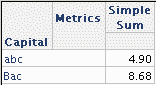
The SQL report shown above returns higher metric values because the database aggregates the fact values for 'abc' and 'Abc' together.
 
The Intelligent Cube that serves as the source for the example view report is configured to normalize incoming attribute data in the database using the option "Normalize Intelligent Cube data basing on dimensions with NO attribute lookup filtering." For each separate hierarchy on the template, a SELECT DISTINCT statement is issued against the attribute's primary lookup table to obtain a complete set of elements (without considering the Intelligent Cube report's filter). For the Capital attribute, the SELECT DISTINCT returns the two elements shown above: 'abc' and 'Bac'.
 
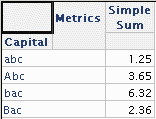
The Intelligent Cube report contains additional attributes that differentiate the four Capital elements found in the table. The metric result table, abbreviated for clarity, is as follows. Note that the database cannot group 'abc' and 'Abc' together because other selected attribute columns (which must also be considered in GROUP BY) have distinct values.

 

ka04W000000Oen6QAC_0EM440000002EG4.gif

 
In Strategy OLAP Services, all string comparisons are case-sensitive. Thus, when the Analytical Engine matches the normalized metric table to the normalized Capital element list, the 'abc' and 'Bac' rows are preserved in the query and the others are dropped. That is, in the database, 'abc' = 'Abc' is true, but in the Analytical Engine, the same comparison is false.
 
Thus the report based on the Intelligent Cube shows a value of 1.25 for 'abc', while the database aggregation returns 1.25 + 3.65 = 4.90 for the same element.
 
ACTION
The root cause of the issue is the use of a database collation (case-insensitive) that is inappropriate for the case-sensitive data. The discrepancy in the database configuration introduces ambiguity into SQL behavior, and ambiguity should generally be avoided in analytical applications. The ideal solution, then, is to change the database collation to handle the data unambiguously.
 
Further, data modeling best practices call for numeric attribute ID columns. The use of text columns for attribute IDs can impair query performance in the database and, in this scenario, opens the door to inconsistent data handling.
 
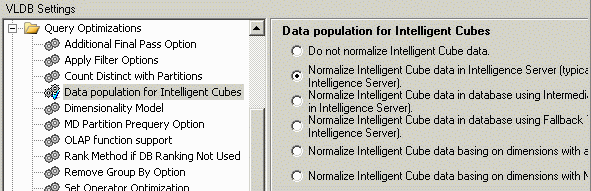
If it is not possible to improve data consistency in the database, the Intelligent Cube report may be configured to normalize data in the Intelligence Server. Either of the following options may be chosen for the "Data population for Intelligent Cube" VLDB property.

  • Do not normalize Intelligent Cube data.
  • Normalize Intelligent Cube data in Intelligence Server (typically faster, but may temporarily use more memory in Intelligence Server).

In either case, the Intelligence Server is responsible for determining the lists of distinct attribute elements, and this operation is always case sensitive. This will eliminate the discrepancy between the metric table and normalized attribute element tables that exist in the Intelligent Cube's in-memory data image.
 
After modifying the Intelligent Cube report to normalize data in Intelligence Server (second option), report executed against the cube no longer omit data that exist in the database. However, attribute elements that differ only in case will be differentiated.
 

ka04W000000Oen6QAC_0EM440000002EFv.gif


ka04W000000Oen6QAC_0EM440000002EG3.gif

 
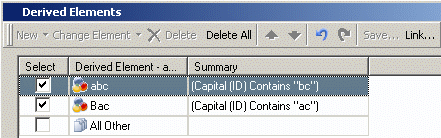
Derived elements may then be used to mimic the SQL results.
 

ka04W000000Oen6QAC_0EM440000002EFx.gif


ka04W000000Oen6QAC_0EM440000002EG5.gif

 
For more details on the behavior of the "Data Population for Intelligent Cube" VLDB property, consult the following Strategy Knowledgebase document.
 
KB32010: What are the Data Population VLDB properties in Strategy Engine 9.x?


Comment

0 comments

Details

Knowledge Article

Published:

June 5, 2017

Last Updated:

June 5, 2017