EducationSoftwareStrategy.com
StrategyCommunity

Knowledge Base

Product

Community

Knowledge Base

TopicsBrowse ArticlesDeveloper Zone

Product

Download SoftwareProduct DocumentationSecurity Hub

Education

Tutorial VideosSolution GalleryEducation courses

Community

GuidelinesGrandmastersEvents
x_social-icon_white.svglinkedin_social-icon_white.svg
Strategy logoCommunity

© Strategy Inc. All Rights Reserved.

LegalTerms of UsePrivacy Policy
  1. Home
  2. Topics

KB320136: New Feature in MicroStrategy Desktop 10.5: Connection to a Web Server can be done using Windows Authentication


Community Admin

• Strategy


Strategy Desktop 10.5 introduces a new feature that allows it to connect to a Web Server using Windows Authentication.
Previously, only Standard authentication could be used when connecting to a Server.
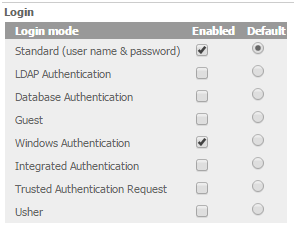
To use this feature, Windows Authentication must be enabled in the Web Server that Strategy Desktop is going to connect to, following the steps in tech note KB205622 and the setting for this authentication enabled under Default Properties > Login, like shown below
ka04W000000Of4cQAC_0EM4400000025O0.jpeg

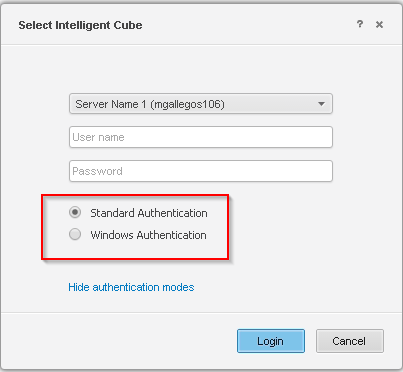
Once this is done, the authentication method can be chosen when adding a dataset or uploading one into the server from Strategy Desktop:
ka04W000000Of4cQAC_0EM4400000025Nu.jpeg

Comment

0 comments

Details

Knowledge Article

Published:

June 12, 2017

Last Updated:

June 12, 2017