EducationSoftwareStrategy.com
StrategyCommunity

Knowledge Base

Product

Community

Knowledge Base

TopicsBrowse ArticlesDeveloper Zone

Product

Download SoftwareProduct DocumentationSecurity Hub

Education

Tutorial VideosSolution GalleryEducation courses

Community

GuidelinesGrandmastersEvents
x_social-icon_white.svglinkedin_social-icon_white.svg
Strategy logoCommunity

© Strategy Inc. All Rights Reserved.

LegalTerms of UsePrivacy Policy
  1. Home
  2. Topics

KB320175: Padding doesn't work for metric header in MicroStrategy Developer 10.x


Stefan Zepeda

Salesforce Solutions Architect • Strategy


Padding doesn't work for metric header in MicroStrategy Developer 10.x

SYMPTOM
Padding doesn't work for metric header in Developer.
STEPS TO REPRODUCE

  • Create a report and set padding, as showed below.
ka02R000000kaXVQAY_0EM440000002Byx.jpeg
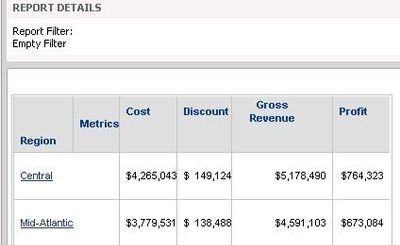
  • The setting doesn't affect the Metrics Header as showed below
ka02R000000kaXVQAY_0EM440000002Bz7.jpeg
  • Check the same report in Web and the setting works.
ka02R000000kaXVQAY_0EM440000002Bz6.jpeg

CAUSE
The third part tool named F1BOOK is used for Grid in Developer, but the third part doesn't support the "padding" functionality, so users cannot take advantage of the function in Developer, while Web can use CSS setting.
WORKAROUND
The office Word/PPT tool also have no "Padding" functionality, but users can use line space instead of the "Padding"to achieve the same results manually.


Comment

0 comments

Details

Knowledge Article

Published:

April 14, 2017

Last Updated:

April 14, 2017