EducationSoftwareStrategy.com
StrategyCommunity

Knowledge Base

Product

Community

Knowledge Base

TopicsBrowse ArticlesDeveloper Zone

Product

Download SoftwareProduct DocumentationSecurity Hub

Education

Tutorial VideosSolution GalleryEducation courses

Community

GuidelinesGrandmastersEvents
x_social-icon_white.svglinkedin_social-icon_white.svg
Strategy logoCommunity

© Strategy Inc. All Rights Reserved.

LegalTerms of UsePrivacy Policy
  1. Home
  2. Topics

KB320212: Value format of metrics is changed automatically after re-prompting in MicroStrategy Developer 10.4


Stefan Zepeda

Salesforce Solutions Architect • Strategy


Value format of metrics is changed automatically after re-prompting in MicroStrategy Developer 10.4

SYMPTOM:
The modification to the value format of a metric affects other metrics' format after re-prompting.
STEPS TO REPRODUCE:
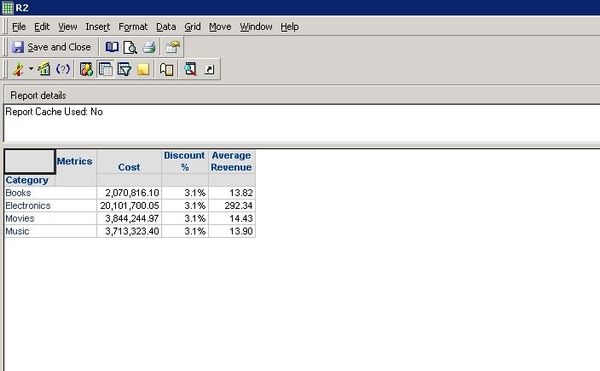
  • Create an object prompt, containing metrics Cost, Discount% and Average Revenue;
  • Create a report with Category attribute and the object prompt created in Step1;
  • Disable the cache in report level excluding the effect of caching;
  • Run the report, add all metrics as prompt answer;
  • Change the format for metric cost to be fix(2 decimal);
  • Save  the report as Prompted(Filter and template will be prompted) without default answer and close. The output is shown as below.
ka02R000000kcZcQAI_0EM440000002BzB.jpeg
  • Run the report again. Choose metric Discount% as prompt answer. Notice that the format for metric Discount% is changed to be fix(2 decimal) automatically. The output is shown as below.
ka02R000000kcZcQAI_0EM440000002Bz9.jpeg

CAUSE:
This is a known issue in Strategy Developer 10.4
ACTION:
Currently this issue is still being reviewed for feasibility by our Technology team and it is not scoped for any upcoming scheduled Strategy release.


Comment

0 comments

Details

Knowledge Article

Published:

April 11, 2017

Last Updated:

April 11, 2017