EducationSoftwareStrategy.com
StrategyCommunity

Knowledge Base

Product

Community

Knowledge Base

TopicsBrowse ArticlesDeveloper Zone

Product

Download SoftwareProduct DocumentationSecurity Hub

Education

Tutorial VideosSolution GalleryEducation courses

Community

GuidelinesGrandmastersEvents
x_social-icon_white.svglinkedin_social-icon_white.svg
Strategy logoCommunity

© Strategy Inc. All Rights Reserved.

LegalTerms of UsePrivacy Policy
  1. Home
  2. Topics

KB320302: Threshold metric formatting does not apply to a graph in MicroStrategy Mobile 10.5 for Android


Community Admin

• Strategy


This document discusses about a known issue with threshold in a graph in MicroStrategy Mobile 10.5 for Android.

SUMMARY:
This Technical Note describes a known defect in Strategy Mobile 10.5. Advanced formatting for a metric does not apply when the document is run in the Strategy Mobile 10.5 application on Android OS devices, but the advanced formatting shows correctly when run on Strategy Mobile 10.5 application on iOS devices. This is a limitation of the Strategy Mobile 10.5 application and has been addressed in the Strategy Mobile 10.6 Android OS application.
 
SYMPTOM:
In Strategy Web 10.5, a user can apply a threshold to change the format of an attribute or metric. For example, a user can change a metric to show an 'X' in place of '$' using advanced formatting. When opening up a document in Strategy Mobile 10.5 on iOS devices, that contains this threshold  applied to a bar graph, the advance formatting shows up correctly. However, when the same document is opened on Strategy Mobile 10.5 for Android OS, the document does not apply the threshold, as shown below.
Result in iOS using correct threshold currency (X):

ka04W000000Ohg9QAC_0EM4400000029nQ.jpeg

Result in Android defaulting back to ($):

ka04W000000Ohg9QAC_0EM4400000029n7.jpeg

 
STEPS TO REPRODUCE:

  • In Strategy Web 10.5, create a report with Category in the rows and Profit in the columns.
  • Right click on Profit and go to Advanced Thresholds.
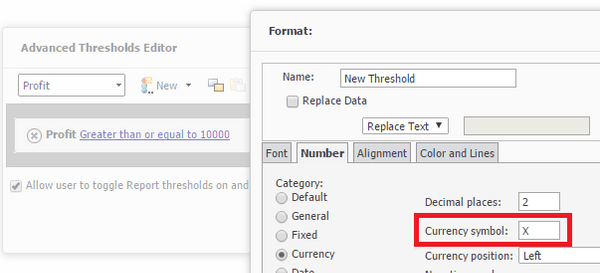
  • Create a threshold on Profit similar to that in the below image:
    if Profit is greater than or equal to 10,000, then change the number Currency symbol.
    Then change the Currency symbol to "X."
ka04W000000Ohg9QAC_0EM4400000029nO.jpeg
  • Save the report.
  • Create a new document from that report.
  • Make a bar graph with Category in the Categories and Profit in the Metrics.
  • Save the document and run to Presentation Mode. Note that the threshold applies to the graph Y-axis values, shown in the picture below.
  • Run the document on Strategy Mobile 10.5 out-of-the-box Android application. Note that the thresholds do not apply to the graph Y-axis values, shown in the picture below.

 
CAUSE:
This is an identified defect in Strategy Mobile 10.5 for Android.
 
ACTION:
This issue has been addressed in Strategy Mobile 10.6. Upgrade to this version to take advantage of this fix.
 
The Strategy Internal Reference Number for the Issue discussed in this technical note is DE48352.


Comment

0 comments

Details

Knowledge Article

Published:

April 25, 2017

Last Updated:

April 25, 2017