SUMMARY:
This Technical Note describes a known limitation of saving a derived metric to a report in Strategy 10.x using Strategy Developer or Strategy Web. When a derived metric is added to the grid of a report and removed from view, but still present in the report objects window, the derived metric object is not saved to the report definition when saving and closing the report.
SYMPTOM:
A derived metric will not save in a report if the derived metric is only present in the report objects window and the report only contains attributes. This limitation does not apply if the derived metric is present on the grid when saving the report or if there are other standalone metrics in the report. If the derived metric is present on the grid when attempting to save and close the report, the derived metric will save as expected.
STEPS TO REPRODUCE:
1. Create a report with one attribute and one derived metric on the Grid.
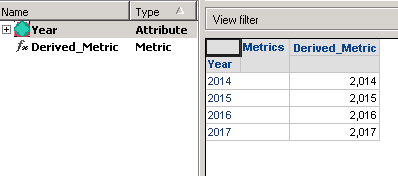
2. Save and close the report. Re-open the report and notice the derived metric still present inside the report.
3. Remove the derived metric from the grid then save and close the report.

4. Re-open the report. You will notice that the derived metric is no longer present inside the report.
Cause:
This is working as designed as derived metrics are currently saved in the view template of the report and not the data template.
ACTION:
One way to get the derived metric to be saved in the report without it being in the grid is to add a standalone metric to the report as well.
1. Create and add an attribute, derived metric, and standard metric on a report.

2. Remove the derived metric from the report, but leave derived metric inside the 'Report Objects' window.
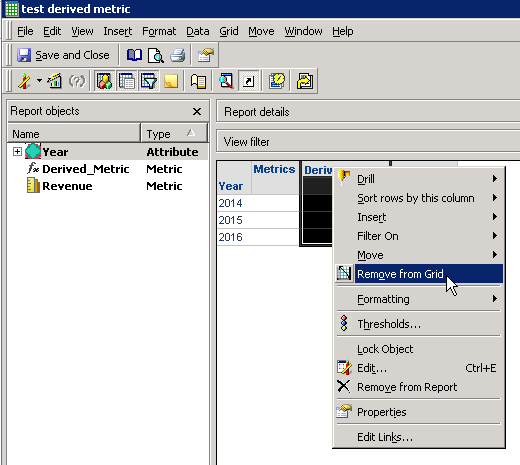
3. Save and close the report and then re-open the report. The derived metric will still be present inside the report objects window.
The standard metric can be present in either the 'Report Objects' window or the grid for the derived metric to save correctly.
