EducationSoftwareStrategy.com
StrategyCommunity

Knowledge Base

Product

Community

Knowledge Base

TopicsBrowse ArticlesDeveloper Zone

Product

Download SoftwareProduct DocumentationSecurity Hub

Education

Tutorial VideosSolution GalleryEducation courses

Community

GuidelinesGrandmastersEvents
x_social-icon_white.svglinkedin_social-icon_white.svg
Strategy logoCommunity

© Strategy Inc. All Rights Reserved.

LegalTerms of UsePrivacy Policy
  1. Home
  2. Topics

KB32049: How to display "Long Names" for attribute forms when delivering reports in HTML and Excel format in MicroStrategy Narrowcast Server 9.x - 10.x?


Community Admin

• Strategy


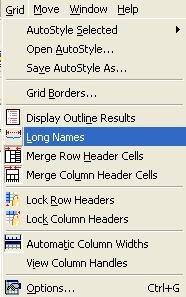
This article described how to display "Long Names" for attribute forms when delivering reports in HTML and Excel format in Narrowcast.

The option 'Long Names' displays attribute forms along with their names in Strategy 9.x - 10.x reports, as follows:
ka04W000000OcBLQA0_0EM440000002Awa.jpeg
ka04W000000OcBLQA0_0EM440000002Awb.jpeg

In order to deliver such a report using Strategy Narrowcast Server, a separate stylesheet needs to be used within the Strategy Narrowcast Server  document to display the long names. The names of these stylesheets along with their location within the Strategy Narrowcast Server  system are shown below:

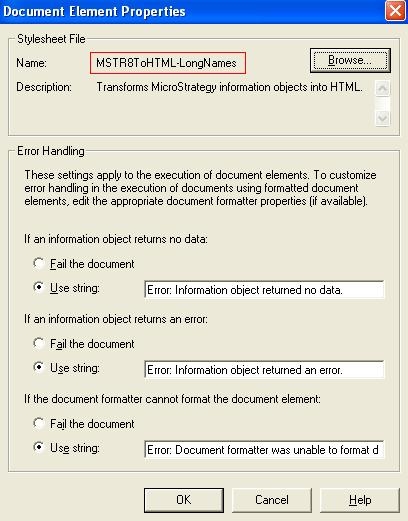
  • HTML format: /Applications/My First Application/Services/XSL Stylesheets/HTML Documents/MSTR8ToHTML-LongNames
  • Excel format: /Applications/My First Application/Services/XSL Stylesheets/Excel Documents/MSTR8ToExcel-LongNames

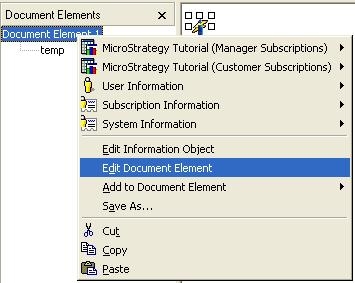
These stylesheets can be used when creating the Strategy Narrowcast Server document. To do so, edit the desired document element and checked the 'Stylesheet File' selected, as shown below:
ka04W000000OcBLQA0_0EM440000002AwX.jpeg
ka04W000000OcBLQA0_0EM440000002Awf.jpeg


Comment

0 comments

Details

Knowledge Article

Published:

May 19, 2017

Last Updated:

May 19, 2017