EducationSoftwareStrategy.com
StrategyCommunity

Knowledge Base

Product

Community

Knowledge Base

TopicsBrowse ArticlesDeveloper Zone

Product

Download SoftwareProduct DocumentationSecurity Hub

Education

Tutorial VideosSolution GalleryEducation courses

Community

GuidelinesGrandmastersEvents
x_social-icon_white.svglinkedin_social-icon_white.svg
Strategy logoCommunity

© Strategy Inc. All Rights Reserved.

LegalTerms of UsePrivacy Policy
  1. Home
  2. Topics

KB320580: The Share with GFE Option Shows on the iPad but Not on the iPhone Using 10.5 Microstrategy Mobile Secured by Good Dynamics


Community Admin

• Strategy


When using the 10.5 MicroStrategy Mobile Secured by Good Dynamics, the share with GFE option shows on the iPad but not on the iPhone when the option in the Good Policy "Prevent copy from GD apps into non GD-apps" is checked in the Good Control Policies settings.

SYMPTOM:
When using the 10.5 Strategy Mobile Secured by Good Dynamics, the share with GFE option shows on the iPad but not on the iPhone when the option in the Good Policy "Prevent copy from GD apps into non GD-apps" is checked in the Good Control Policies settings.
 
STEPS TO REPRODUCE: 

  • In Good Control, under Policies go to Policy Sets.
  • Click on the policy set in use.
  • In the 'Manage Policy Set' click on 'Security Policies' tab.
  • Scroll down to the section Data Leakage Prevention.
  • Check the option "Prevent copy from GD apps into non GD-apps".
ka04W000000Oe4CQAS_0EM440000002GMC.jpeg
  • On an iPad run any document and click on the three dots icon (top right corner). Notice how there is an option to share with Good for Enterprise.                                                                  
ka04W000000Oe4CQAS_0EM440000002GMI.jpeg
  • On an iPhone, run any document and click on the three dots icon (top right corner). Notice how there is NO option to share with Good for Enterprise.                                                        
ka04W000000Oe4CQAS_0EM440000002GME.jpeg

 
CAUSE:
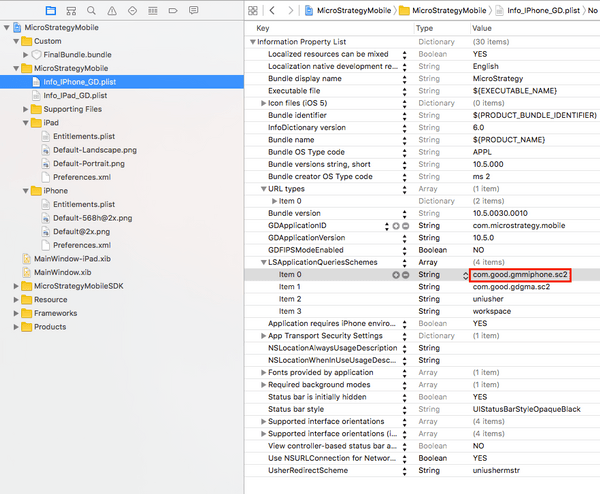
 The App ID of Good For Enterprise is not added by default in Info_IPhone_GD.plist as in Info_IPad_GD.plist.
 
ACTION:
To share with GFE on iPhones, the Good For Enterprise application ID 'com.good.gmmiphone.sc2' must be added to LSApplicationQueriesSchemes in Info_IPhone_GD.plist file.
ka04W000000Oe4CQAS_0EM440000002GMG.jpeg

 
After recompiling, now the option to share will appear on the iPhone:

ka04W000000Oe4CQAS_0EM440000002GMK.jpeg

Comment

0 comments

Details

Knowledge Article

Published:

March 30, 2017

Last Updated:

March 30, 2017