EducationSoftwareStrategy.com
StrategyCommunity

Knowledge Base

Product

Community

Knowledge Base

TopicsBrowse ArticlesDeveloper Zone

Product

Download SoftwareProduct DocumentationSecurity Hub

Education

Tutorial VideosSolution GalleryEducation courses

Community

GuidelinesGrandmastersEvents
x_social-icon_white.svglinkedin_social-icon_white.svg
Strategy logoCommunity

© Strategy Inc. All Rights Reserved.

LegalTerms of UsePrivacy Policy
  1. Home
  2. Topics

KB320813: "Zoom Fit Page" does not work when using URL API with the "&hiddensections" parameter in it in MicroStrategy Web 10.3


Community Admin

• Strategy


SYMPTOM: 
User can apply the "&hiddensections" parameter in a URL API link to hide certain sections of the page in Strategy Web 10.x.
Note: For more information on this, refer to tech note KB32603 .
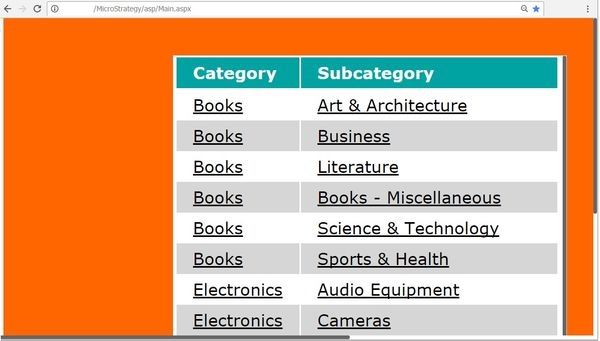
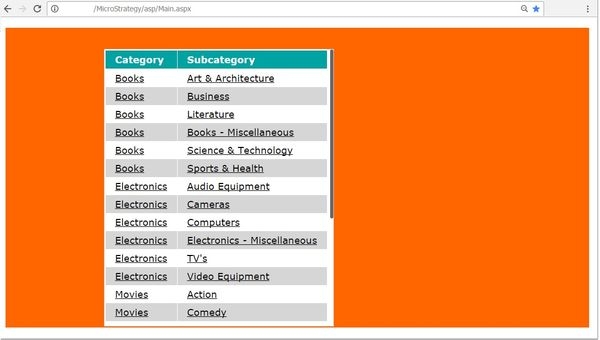
However, in Strategy Web 10.3, when applying "&hiddensections=header,path" to a link that points to a document, the Zoom option to "Fit Page" no longer applies to the document and the zoom defaults to a different zoom. value, as shown below.
Without the parameter in the URL:
ka04W000000Ofs9QAC_0EM4400000025Om.jpeg

 With the parameter in the URL:

ka04W000000Ofs9QAC_0EM4400000025Ok.jpeg


STEPS TO REPRODUCE:

  • Create a Document.
  • Add a grid with one metric and on attribute.
  • Run into Presentation Mode.
  • From the hamburger button drop down, click Zoom (Fit Page), as shown below:
ka04W000000Ofs9QAC_0EM4400000025OY.jpeg
  • Save the document.
  • Get the URL API to execute the document by right clicking on the document from the folder browsing page > Share > Link. 
  • Add the "&hiddensections=header,path" parameter to the end of the URL and execute it on the browser.
  • Notice how it does not fit to page (Appears that the hiddenSection bypasses the presentation mode setup)

 
CAUSE:
This is an identified defect in Strategy Web 10.3.
 
ACTION:
This issue has been addressed in Strategy Web 10.6. Upgrade to this version to take advantage of this fix.
 
The Strategy Internal Reference Number for the issue discussed in this technical note is DE49935.


Comment

0 comments

Details

Knowledge Article

Published:

June 13, 2017

Last Updated:

June 13, 2017