Summary:
This Technical Note describes a known issue with displaying certain metrics in dynamic text of a text field of Visual Insight after exporting the Dashboard to Strategy Analytics Desktop, connecting to Server from Strategy Analytics Desktop, or re-importing the dashboard file into Strategy Web. This has been observed in Strategy 10.4. Depending on the metric formula and metric formatting, the metric will be successfully added to the text field, but it will display an empty white space instead of the actual value.
Symptom:
This issue is not a common occurrence and cannot be reproduced with common sum metrics such as Cost and Revenue. Specifically, the issue occurs with the formula:
Max(AddDays(MonthEndDate(AddMonths(CurrentDate(), -1)), 0)) {~}.
The issue has only been reproduced on 10.4 of Strategy Web (after re-importing the dashboard file) and Strategy Analytics Desktop, but the issue could exist on other versions of the 10.x platform.
Steps to Reproduce:
1. Create a metric with the formula:
Max(AddDays(MonthEndDate(AddMonths(CurrentDate(), -1)), 0)) {~}
Formatting it as date.
2. Create a report with Year, Month, Cost and the new metric created above.
3. Create a Visual Insight dashboard and add a text box with the metric as dynamic text.
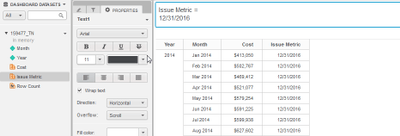
4. Save and download the dashboard.
5. Import the dashboard in Strategy Analytics Desktop or connect to a server to download it; notice the dynamic text will not show, a blank space will show instead.

Cause:
This is an identified defect in Strategy Analytics Desktop and Strategy Web 10.4.
Action:
Currently this issue is still being reviewed for feasibility by our Technology Team and it is not scoped for any upcoming scheduled Strategy release. Please contact Strategy Technical Support for an update of this issue.
The Strategy Internal Reference Number for the issue discussed in this technical note is DE53036.
