EducationSoftwareStrategy.com
StrategyCommunity

Knowledge Base

Product

Community

Knowledge Base

TopicsBrowse ArticlesDeveloper Zone

Product

Download SoftwareProduct DocumentationSecurity Hub

Education

Tutorial VideosSolution GalleryEducation courses

Community

GuidelinesGrandmastersEvents
x_social-icon_white.svglinkedin_social-icon_white.svg
Strategy logoCommunity

© Strategy Inc. All Rights Reserved.

LegalTerms of UsePrivacy Policy
  1. Home
  2. Topics

KB321069: Ending (fact) metric generates wrong results on a View Report in MicroStrategy Secure Enterprise 10.0 - 10.2


Community Admin

• Strategy


This article notes an issue with non-aggregatable metrics and cubes in MicroStrategy

SYMPTOM
In Strategy Secure Enterprise 10.0 - 10.2, in some cases, Ending (fact) metrics generates wrong results in a View report.
 
Below scenarios could generate correct results:

  • The metric’s grouping target attribute is on the View report
  • Creating a normal report with the same Ending (fact) metric, without the metric’s grouping target attribute in grid and with dynamic sourcing enabled, the normal report hits the Intelligent cube.

STEPS TO REPRODUCE
 The following steps are based on the Strategy Tutorial project: 
 

  • Use the out-of-the-box Strategy Tutorial Access warehouse, and delete the last record where Month=201612 and Category=4 from the table MNTH_CATEGORY_SLS.
  • Create an ending-fact metric named M1 with the formula of "Sum([Units Sold]) {~+, >|Month+}" as shown below:
ka04W000000OfviQAC_0EM440000002BzS.jpeg

  
Normal report returns correct data: 

  1. Create a normal report with Year on the row and the above metric M1 on the Colum.
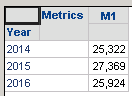
  2. Execute the report and notice for the year 2016, it returns correct result of 25,924 (3 categories with Dec 2016 data) as shown below:
ka04W000000OfviQAC_0EM440000002BzR.jpeg


The SQL is as below:


create table ZZNB00 (
 YEAR_ID SHORT, 
 MONTH_ID LONG, 
 WJXBFS1 DOUBLE)
insert into ZZNB00 
 select a12.[YEAR_ID] AS YEAR_ID,
 a11.[MONTH_ID] AS MONTH_ID,
 sum(a11.[TOT_UNIT_SALES]) AS WJXBFS1
 from [MNTH_CATEGORY_SLS] a11, 
 [LU_MONTH] a12
 where a11.[MONTH_ID] = a12.[MONTH_ID]
 group by a12.[YEAR_ID],
 a11.[MONTH_ID]
create table ZZMB01 (
 YEAR_ID SHORT, 
 WJXBFS1 LONG)
insert into ZZMB01 
 select pc11.[YEAR_ID] AS YEAR_ID,
 max(pc11.[MONTH_ID]) AS WJXBFS1
 from [ZZNB00] pc11
 group by pc11.[YEAR_ID]
select distinct pa11.[YEAR_ID] AS YEAR_ID,
 pa11.[WJXBFS1] AS WJXBFS1
 from [ZZNB00] pa11, 
 [ZZMB01] pa12
 where pa11.[MONTH_ID] = pa12.[WJXBFS1] and 
 pa11.[YEAR_ID] = pa12.[YEAR_ID]
drop table ZZNB00
drop table ZZMB01
[Analytical engine calculation steps:
 1. Perform cross-tabbing
 ]
 
View Report returns incorrect data:

  1. Create an Intelligent Cube named C1 with Year, Month, Category, and the metric M1;
  2. Publish the Intelligent Cube.
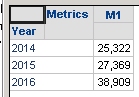
  3. Create a subset report named R2 based on C1 with Year and the metric M1on the grid
  4. Execute the report and notice for the year 2016, it returns wrong result of 38,909 as shown below:
ka04W000000OfviQAC_0EM440000002BzT.jpeg

The CSI is as below:


Intelligent Cubes Accessed:
[C1]
Intelligent Cube SQL Statements:
Pass0 - Duration: 0:00:00.01
Tables Accessed:
Table3 [F_MAIN_INDEX]: Year, Category, Month, M1, FACT_TABLE

select [Year]@[YEAR_ID],
 sum(First<SortBy= ([[Month]] Desc)>([[F_MAIN_INDEX].M1])@{[Category],[Year]})@{[Year]} as [M1]
from C1
with Table Join Tree: [F_MAIN_INDEX]
[Analytical engine calculation steps:
 1. Perform cross-tabbing
]
 
Using Dynamic sourcing, Normal report returns correct data:

  1. With dynamic sourcing enabled for C1, and executing the normal report R1 again, notice Intelligent Cube Q1 is hit and data 25,924 is correct:
ka04W000000OfviQAC_0EM440000002BzU.jpeg


The CSI is as below:


Intelligent Cubes Accessed:
[C1]
Intelligent Cube SQL Statements:
Tables Accessed:
Table3 [F_MAIN_INDEX]: Year, Category, Month, M1, FACT_TABLE
 
select [Category]@[CATEGORY_ID],
 [Month]@[MONTH_ID],
 Rank<ASC=False, BreakBy={[[Year]]}>(IF([[F_MAIN_INDEX].M1] is not null, [Month]@[MONTH_ID], NULLIF(0, 0))) as [Generated NonAgg Metric:01BCBD474BD3CEEEE89F8496E7C86E0F]
from C1
with Table Join Tree: [F_MAIN_INDEX]
Save As TempTable4
 
select [Year]@[YEAR_ID],
 sum(IF([TempTable4.Generated NonAgg Metric:01BCBD474BD3CEEEE89F8496E7C86E0F] = 1, [[F_MAIN_INDEX].M1], NULLIF(0, 0)))@{[Year]} as [M1]
from C1
with Table Join Tree: TempTable4
 Join [F_MAIN_INDEX] with output level Tuple([Category]@[CATEGORY_ID], [Month]@[MONTH_ID], [Year]@[YEAR_ID])
having [M1] is not null

[Analytical engine calculation steps:
 1. Perform cross-tabbing
]

CAUSE
This is a known issue with Strategy Secure Enterprise 10.0 - 10.2.  In a regular report, SQL is aggregating data, and then getting the last fact value for the non-aggregatable attribute in the pre-aggregated intermediate table, whereas in the View Report, CSI is first getting the last fact value at the fact level, and then aggregating over other attributes. In other words, SQL engine does a Last(Sum(metric){~,nonAggAttr}){~}, while CSI does the following: Sum(Last(metric){FactLevel-nonAggAttr}){~}
ACTION
This issue will be addressed in the Strategy feature release and Strategy 10.4 Hotfix scheduled to be released in Q2 2017. The CSI generated for the view report will be similar to the example given below: Rank function is used instead of First. 


select      [Year]@[YEAR_ID],  sum(IF(Rank<ASC=False, BreakBy={[[Year]]}>(IF([[F_MAIN_INDEX].M01=Sum(Cost){~+,>|Month+}] is not null, [Month]@[MONTH_ID], NULLIF(0, 0))) = 1, [[F_MAIN_INDEX].M01=Sum(Cost){~+,>|Month+}], NULLIF(0, 0)))@{[Year]} as [M01=Sum(Cost){~+,>|Month+}]          -- Use Rank instead of First to get the right data 
from         C01.1=Year, Month, Category, M1
with Table Join Tree:             [F_MAIN_INDEX]

 
The Strategy internal reference for this issue is DE36346. 


Comment

0 comments

Details

Knowledge Article

Published:

May 16, 2017

Last Updated:

July 17, 2017