EducationSoftwareStrategy.com
StrategyCommunity

Knowledge Base

Product

Community

Knowledge Base

TopicsBrowse ArticlesDeveloper Zone

Product

Download SoftwareProduct DocumentationSecurity Hub

Education

Tutorial VideosSolution GalleryEducation courses

Community

GuidelinesGrandmastersEvents
x_social-icon_white.svglinkedin_social-icon_white.svg
Strategy logoCommunity

© Strategy Inc. All Rights Reserved.

LegalTerms of UsePrivacy Policy
  1. Home
  2. Topics
  3. KB321166: M8MulPrc_32.exe process are spawned when running MicroStrategy Intelligence Server 10.x on 64-bit Windows Operating Systems

KB321166: M8MulPrc_32.exe process are spawned when running MicroStrategy Intelligence Server 10.x on 64-bit Windows Operating Systems


Community Admin

• Strategy


SYMPTOM
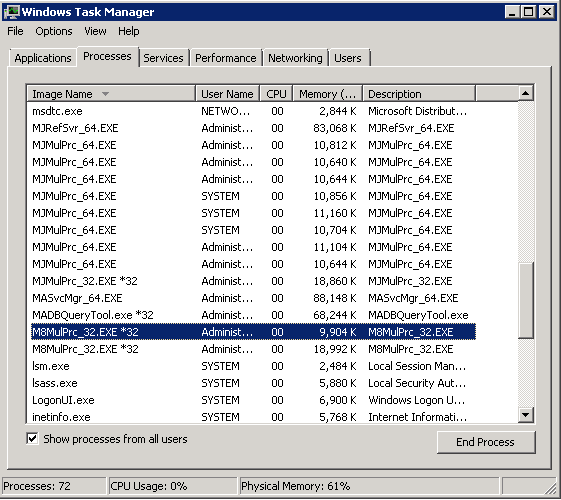
M8MulPrc_32.exe process are seen on Windows task manager when running Strategy Intelligence Server 10.x on a Windows 64-bit Operating System as shown below:
ka04W000000Oh1uQAC_0EM44000000298u.jpeg

 
Starting with Strategy 9.3.x the MJMulPrc_64.exe has been introduced to handle inter-process communications with 64-bit ODBC drivers. The functionality of this is the same as that of the previously existing MJMulPrc_32.exe.
 
CAUSE
M8MulPrc_32 process handles multiple tasks including the following:

  1. Some ODBC drivers are 32 bit, such as Access/Excel/MDX(MSAS,Essbase,TM1) sources, it uses 32 bit process (M8MulPrc_32.exe) on Windows Operating Systems.
  2. Some Distribution Services processing and delivery tasks.
  3. Child process of Strategy Enterprise Manager Data Load process. During the Enterprise Manager data load, every time a new child process M8MulPrc_32.exe is created for each object or statistics table, and after the step is complete, the process is closed. It is observed that several M8MulPrc_32.exe processes are created and closed continuously during the data load.

Therefore, it is expected to see a few 32-bit processes running even when running the Intelligence Server on a 64-bit Operating System.


Comment

0 comments

Details

Knowledge Article

Published:

June 6, 2017

Last Updated:

June 6, 2017