EducationSoftwareStrategy.com
StrategyCommunity

Knowledge Base

Product

Community

Knowledge Base

TopicsBrowse ArticlesDeveloper Zone

Product

Download SoftwareProduct DocumentationSecurity Hub

Education

Tutorial VideosSolution GalleryEducation courses

Community

GuidelinesGrandmastersEvents
x_social-icon_white.svglinkedin_social-icon_white.svg
Strategy logoCommunity

© Strategy Inc. All Rights Reserved.

LegalTerms of UsePrivacy Policy
  1. Home
  2. Topics

KB32132: Bulk export reports fail with the error "MSIBulkExportConnection::GetBulkExportChunk: Max Export Time(xxx sec) has reached" recorded in the DSSErrors.log with MicroStrategy Intelligence Server 10.x


Community Admin

• Strategy


Bulk export reports fail with the error "MSIBulkExportConnection::GetBulkExportChunk: Max Export Time(xxx sec) has reached" recorded in the DSSErrors.log with MicroStrategy Intelligence Server 10.x

SYMPTOM:
A report configured for bulk export fails during execution, reporting the following error in the DSSErrors.log on the Strategy Intelligence Server 10.x machine:
 
Sample Code/Error
MSIBulkExportConnection::GetBulkExportChunk: Max Export Time(xxx sec) has reached.  Job with jobid: xxx (description: <description>) will be cancelled.
 
CAUSE:
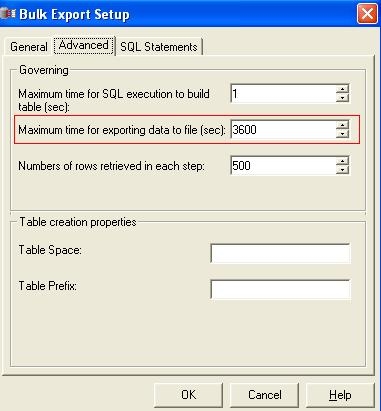
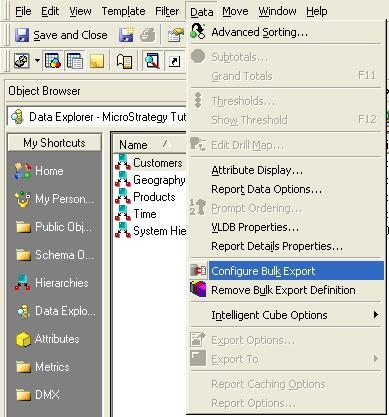
The governing setting "Maximum time for exporting data to file (sec)" for the bulk export report has been reached. This setting can be located by editing the report configured for bulk export, from Strategy Developer 10.x, and going to Data menu > Configure Bulk Export:
 

ka04W000000Oh64QAC_0EM440000002Awv.jpeg


ka04W000000Oh64QAC_0EM440000002Awx.jpeg

 
ACTION:
Increase the value for "Maximum time for exporting data to file (sec)" to allow sufficient time for the bulk export report to perform the export to file completely.


Comment

0 comments

Details

Knowledge Article

Published:

June 4, 2017

Last Updated:

June 4, 2017