EducationSoftwareStrategy.com
StrategyCommunity

Knowledge Base

Product

Community

Knowledge Base

TopicsBrowse ArticlesDeveloper Zone

Product

Download SoftwareProduct DocumentationSecurity Hub

Education

Tutorial VideosSolution GalleryEducation courses

Community

GuidelinesGrandmastersEvents
x_social-icon_white.svglinkedin_social-icon_white.svg
Strategy logoCommunity

© Strategy Inc. All Rights Reserved.

LegalTerms of UsePrivacy Policy
  1. Home
  2. Topics

KB32164: When sending a bulk export report via distributions services file or email deliveries, the file does not have any extension associated unless compressed in MicroStrategy Web


Community Admin

• Strategy


When sending bulk export report for file or email delivery through distribution services in MicroStrategy Web 9.x and 10.x, the resulting file will have no extension. 

SYMPTOM:
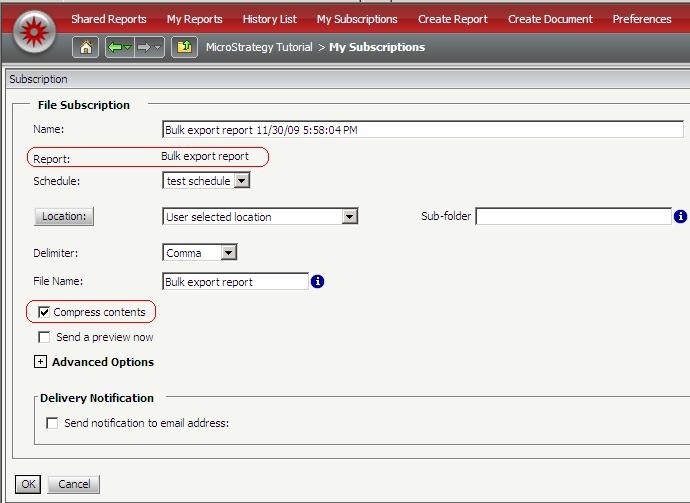
When sending bulk export report for file or email delivery through distribution services in Strategy Web 9.x and 10.x, the resulting file will have no extension.  However, if the bulk export file is compressed, even though the file delivered will have a .zip extension, when uncompressing, the resulting file will also not have any extension of its own.
 

ka04W000000Og25QAC_0EM440000002887.jpeg


CAUSE:
This behavior is by design. The objective is that the end user may have the flexibility to open the file with any application since a bulk export file is usually just a text file. The information can be accessed (and associated) with notepad (to a certain size limit), wordpad, excel or any other application supporting a large text file.
 
ACTION:
The user can rename or add the extension to the bulk export file as convenient or associate the file to a particular type of extension or application.


Comment

0 comments

Details

Knowledge Article

Published:

July 12, 2017

Last Updated:

July 12, 2017