When executing reports from MicroStrategy Web 9.4.x and 10.x, sometimes, seemingly randomly, the following error message is received:

When executing reports from MicroStrategy Web 9.4.x and 10.x, sometimes, seemingly randomly, the following error message is received:
Error messageError in report results:
If the DSSErrors.log file corresponding to the time that the error was received from MicroStrategy Web 9.4.x or 10.x is investigated, the following message, or similar messages, may be seen:
Error2016-11-18 13:00:29.620-05:00 WSResult::SaveToFile: failed to write to file C:\Program Files (x86)\MicroStrategy\Intelligence Server\TmpPool\A2D5222043BA7C68B9859696AE9C38E5.po, exception caught: Failed to write 512 bytes to file `512`. (Server message 305419896) There is not enough space on the disk. (Windows API error 112)
CAUSE:
When users request a report or document execution through MicroStrategy Web, the Intelligence Server keeps the results in memory for the user session in a storage mode called 'Working Set'. The behaviour of the working set is explained in detail in the Technical Note: KB10138: How are the concepts of Working Set, Working Set Result Pool, History List related to each other in MicroStrategy Intelligence Server?
The issue here, as seen in the logs, is that the machine on which the MicroStrategy Intelligence Server 9.4.x or 10.x process is running, is out of disk storage space. The underlying reason the Intelligence Server needs this disk storage is because the 'Maximum RAM for Working Set Cache' governing setting would be exceeded with the results for the current execution, so the Intelligence Server would have to temporarily swap a working set cache from memory onto disk to make space for the current execution results in memory.
Because the Intelligence Server was unable to swap out a working set instance, the current report or document results could not be added to the working set and sent to the user.
ACTION:
The simple solution for the users would be to add hard disk storage on the MicroStrategy Intelligence Server 9.4.x - 10.x machine. Alternatively, users can change the setting for the 'Working Set file directory' to point to a disk location with sufficient space for any working set swapping.
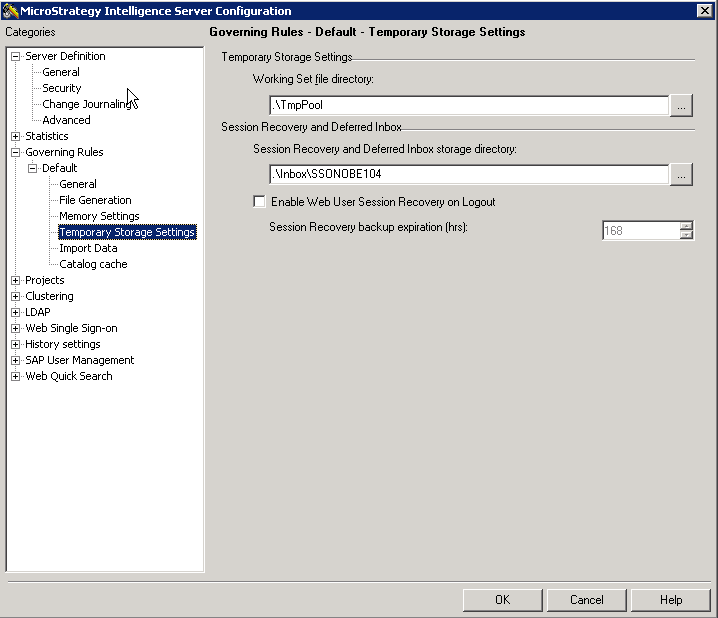
In general, however, it is advised that the users consider increasing the governing setting for the 'Maximum RAM for working set cache' to a sufficiently high value no higher than the 25% of the available RAM for the server, so that no swapping of working set to disk is required during peak load conditions. In addition to avoiding the error above, users should also experience better performance because swapping of working set to pool would result in lower response times from the Intelligence Server:
KB8617: What is the 'Working Set' governor setting in MicroStrategy Intelligence Server 9.4.x-10.x?
