EducationSoftwareStrategy.com
StrategyCommunity

Knowledge Base

Product

Community

Knowledge Base

TopicsBrowse ArticlesDeveloper Zone

Product

Download SoftwareProduct DocumentationSecurity Hub

Education

Tutorial VideosSolution GalleryEducation courses

Community

GuidelinesGrandmastersEvents
x_social-icon_white.svglinkedin_social-icon_white.svg
Strategy logoCommunity

© Strategy Inc. All Rights Reserved.

LegalTerms of UsePrivacy Policy
  1. Home
  2. Topics

KB32199: No element is available for selection in attribute element list prompts or View filters in MicroStrategy Developer - Web 9.4.x-10.x


Stefan Zepeda

Salesforce Solutions Architect • Strategy


No attribute element is available when answering an attribute element list prompt or View filter from MicroStrategy Developer or Web. Attribute browsing is disabled for all attributes, and no error message appears.
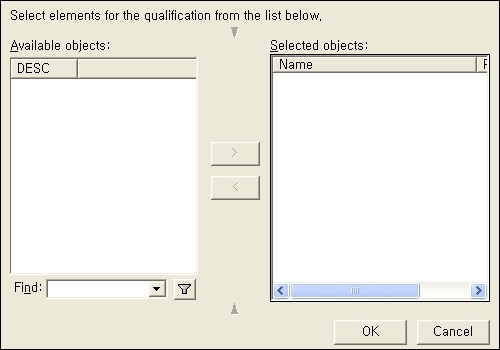
SYMPTOM:
No attribute element is available when answering an attribute element list prompt or View filter from Strategy Developer or Web. Attribute browsing is disabled for all attributes, and no error message appears.

ka02R000000kcSDQAY_0EM440000002EFI.jpeg

 
CAUSE:
The 'Element display' option in the Attribute Editor is set to 'Locked'.
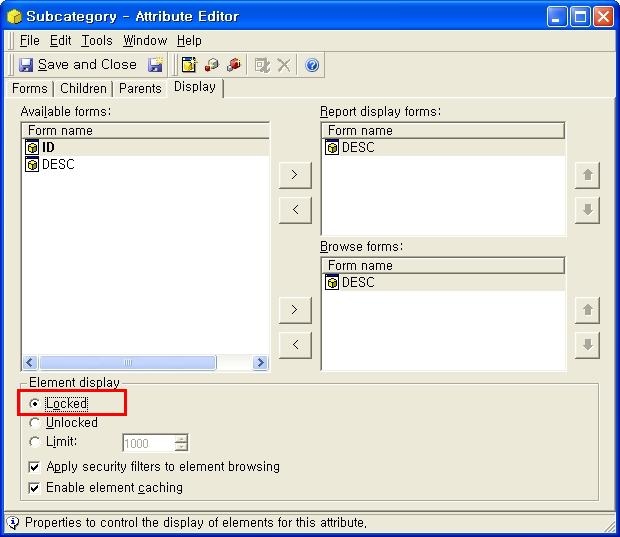
 

ka02R000000kcSDQAY_0EM440000002EFK.jpeg

 
The 'Locked' option will cause no attribute elements of a given attribute to be shown within the System Hierarchy in the Data Explorer or all types of attribute element browsing, including attribute element prompts, View Filter or Report Filter editors.
 
ACTION:
Change the option to either 'Unlocked' or 'Limit' in the Attribute Editor.


Comment

0 comments

Details

Knowledge Article

Published:

April 19, 2017

Last Updated:

April 19, 2017