EducationSoftwareStrategy.com
StrategyCommunity

Knowledge Base

Product

Community

Knowledge Base

TopicsBrowse ArticlesDeveloper Zone

Product

Download SoftwareProduct DocumentationSecurity Hub

Education

Tutorial VideosSolution GalleryEducation courses

Community

GuidelinesGrandmastersEvents
x_social-icon_white.svglinkedin_social-icon_white.svg
Strategy logoCommunity

© Strategy Inc. All Rights Reserved.

LegalTerms of UsePrivacy Policy
  1. Home
  2. Topics

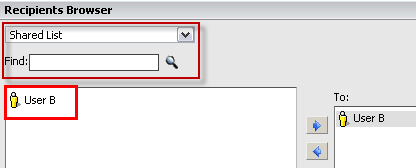
KB32250: "Shared List" drop down menu and "Find" text box are missing from the "Recipients Browser" dialog when subscribing other users to report in MicroStrategy Web


Community Admin

• Strategy


In MicroStrategy 9.x when subscribing other users to report with MicroStrategy Distribution Services 9.x the "Shared List" drop down menu and "Find" text box are missing from the "Recipients Browser" dialog.

SYMPTOM:
In Strategy 9.x when subscribing other users to report with Strategy Distribution Services 9.x the "Shared List" drop down menu and "Find" text box are missing from the "Recipients Browser" dialog, as shown below:
 

ka04W000000Oe0eQAC_0EM44000000287S.png

 
CAUSE:
The user does not have the "Web subscribe others" privilege to subscribe others to report.
 
ACTION:
Login to project source, go to 'Administration' -> 'User Manager'.
Edit the user, click 'User Definition' -> 'Project Access' and grant the user "Web subscribe others" privilege under "Web Professional" as picture shown below:
 

ka04W000000Oe0eQAC_0EM44000000287P.png


Comment

0 comments

Details

Knowledge Article

Published:

June 14, 2017

Last Updated:

June 14, 2017