EducationSoftwareStrategy.com
StrategyCommunity

Knowledge Base

Product

Community

Knowledge Base

TopicsBrowse ArticlesDeveloper Zone

Product

Download SoftwareProduct DocumentationSecurity Hub

Education

Tutorial VideosSolution GalleryEducation courses

Community

GuidelinesGrandmastersEvents
x_social-icon_white.svglinkedin_social-icon_white.svg
Strategy logoCommunity

© Strategy Inc. All Rights Reserved.

LegalTerms of UsePrivacy Policy
  1. Home
  2. Topics

KB32272: Japanese characters in the Page-by section of a grid report are not displayed and/or are displayed broken or as squares when exporting to PDF from MicroStrategy Web.


Community Admin

• Strategy


Symptom

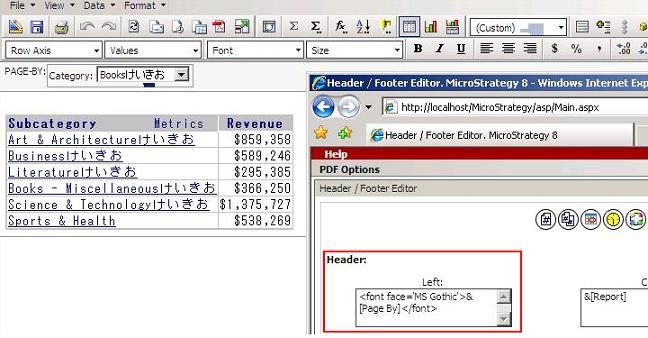
Japanese characters in the Page-by section of grid report are not displayed and/or are displayed broken or as squares when exporting to PDF from Strategy Web 9.x/10.x.

ka04W000000OfIlQAK_0EM44000000284a.jpeg


Cause

The Header and Footer sections of the PDF are not using the fonts that support Japanese characters.
 

Action

Modify the Header PDF options so the Arial Unicode or MS Gothic fonts are used on this section. Follow these steps to modify the Header PDF options:
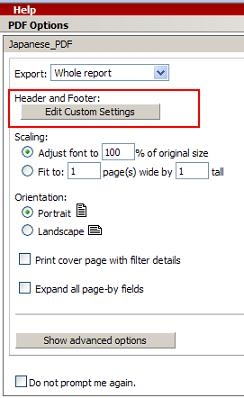
  • Click on the PDF export button.
  • Under the Header and Footer section click on 'Edit Custom Settings'.
ka04W000000OfIlQAK_0EM44000000284Y.jpeg
  • Depending on the fonts installed on the Strategy Intelligence Server  to support Japanese characters( Arial Unicode or MS Gothic), add one of the following lines under the Header sections:

 
Sample Code/Error

<font face='Arial Unicode'>&</font> 

or  
<font face='MS Gothic'>&</font>


ka04W000000OfIlQAK_0EM44000000284d.jpeg


Comment

0 comments

Details

Knowledge Article

Published:

July 19, 2017

Last Updated:

July 19, 2017