This technote explains how to enable document caching (as shown below) for all formats using Strategy Web SDK.
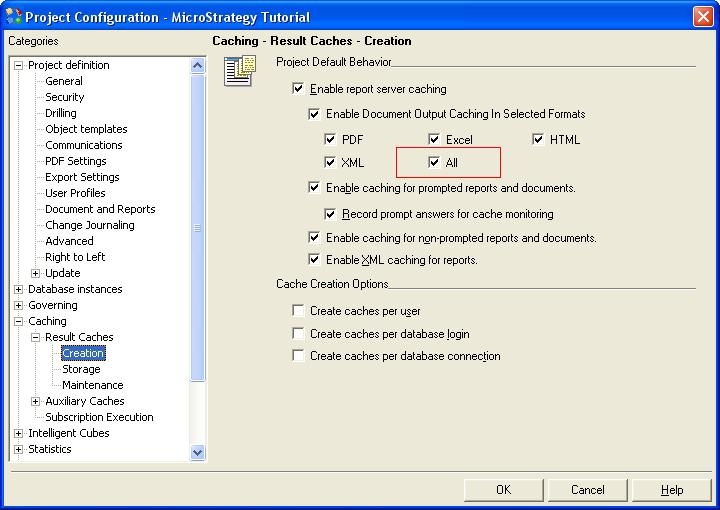
Note that the code below will be applied to all projects on the Intelligence Server provided:
package com.mstr.standalone;
import com.Strategy.web.objects.WebFolder;import com.Strategy.web.objects.WebIServerSession;import com.Strategy.web.objects.WebObjectInfo;import com.Strategy.web.objects.WebObjectsException;import com.Strategy.web.objects.WebObjectsFactory;import com.Strategy.web.objects.WebProjectReference;import com.Strategy.web.objects.WebProjectReferences;import com.Strategy.web.objects.WebProjectSetting;import com.Strategy.web.objects.WebProjectSettings;import com.Strategy.web.objects.WebServerDef;import com.Strategy.web.objects.WebServerSettings;import com.Strategy.webapi.EnumDSSXMLAuthModes;import com.Strategy.webapi.EnumDSSXMLFolderNames;import com.Strategy.webapi.EnumDSSXMLObjectTypes;
public class DocumentOutputCaching_ProjectLevel { public static void main(String[] args){ //Need to modify the Session information. WebObjectsFactory wof = WebObjectsFactory.getInstance(); WebIServerSession wiss = wof.getIServerSession(); wiss.setServerName("I-Server"); wiss.setServerPort(34952); wiss.setAuthMode(EnumDSSXMLAuthModes.DssXmlAuthStandard); wiss.setLogin("Administrator"); wiss.setPassword(""); try{ String currSessID = wiss.getSessionID(); int changed = 0; String ServerDefFolderID = wof.getObjectSource().getFolderID(EnumDSSXMLFolderNames.DssXmlFolderNameConfigureServerDefs); System.out.println("definition ID: ---- " + ServerDefFolderID); WebFolder ServerDefFolder = (WebFolder) wof.getObjectSource().getObject(ServerDefFolderID, EnumDSSXMLObjectTypes.DssXmlTypeFolder, true); if(ServerDefFolder != null){ for(int i=0;i < ServerDefFolder.size();i++){ WebObjectInfo woi = ServerDefFolder.get(i); if(woi.getType() == EnumDSSXMLObjectTypes.DssXmlTypeServerDef){ WebServerDef currSrvrDef = (WebServerDef) woi; currSrvrDef.populate(); System.out.println("def name: " + currSrvrDef.getDisplayName()); WebProjectReferences wprf = currSrvrDef.getProjectReferences(); WebServerSettings settings = currSrvrDef.getServerSettings(); int sizePreference = wprf.size(); int sizeServerSettings = settings.size(); String def = currSrvrDef.getDisplayName(); for(int k=0; k<wprf.size(); k++) { WebProjectReference reference = wprf.get(k); System.out.println("Project Name: "+ reference.getName()); WebProjectSettings projectSettingS = reference.getProjectSettings(); for (int n=0; n< projectSettingS.size(); n++) { WebProjectSetting singleSetting = projectSettingS.get(n); System.out.println("ID: ----- "+singleSetting.getID()); System.out.println("Value: ---- "+singleSetting.getValue()); //Setting the Document Output Caching: 499 is for Selection All if(singleSetting.getID()==77) { singleSetting.setValue("499"); } } } wof.getObjectSource().save(currSrvrDef); } } } }catch(WebObjectsException e) { ; } }}
For the sample to work, the Strategy Web JAR files must be accessible by the Java Runtime
Environment. The Strategy Web JAR files can be found under:
NOTE: More elaborate programs will require additional library files and are out of the scope of this document.
CUSTOMIZATION WARNING:
This customization is provided as a convenience to Strategy users and is only directly applicable to the version stated. While this code may apply to other releases directly, Strategy Technical Support makes no guarantees that the code provided will apply to any future or previous builds. In the event of a code change in future builds, Strategy Technical Support makes no guarantee that an updated version of this particular customization will be provided. In the event of a code change in future builds, Strategy may not be able to provide additional code on this matter even though this customization is provided at this time for this specific build. For enhancements to this customization or to incorporate similar functionality into other versions, contact your Account Executive to inquire about Strategy Consulting assistance.
