SYMPTOM:
When creating a freeform SQL report, the attributes and metrics are created on the backend and thus managed by the system rather than the Strategy Administrator. When initially migrating a freeform SQL report to another environment, these managed objects are migrated to the other environment. But after altering these managed objects and re-migrating the report, the changes made to the managed objects are not reflected in the target environment.
The image below shows a freeform SQL report that displays the total for the metric MetricTest created in the freeform SQL report. When initially migrating the report to another environment, you will see the same results when the report is run in the target environment.
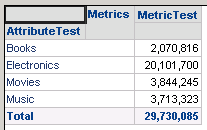
The total subtotal function and dynamic aggregation function can be changed for the MetricTest metric as seen below to alter the total seen in the freeform SQL report. As seen below, the total subtotal function and dynamic aggregation function for MetricTest was changed from Sum to Maximum.

The report results after making this change can be seen below.
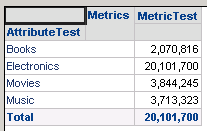
However after re-migrating the freeform SQL report to the target environment, the report still shows the results with the total subtotal function and dynamic aggregation function set to Sum. This is because the managed objects are not automatically migrated with the freeform SQL report. Even after creating a package and adding all used dependencies for the freeform SQL report, the changes made to the managed object will still not be reflected in the target environment.
STEPS TO REPRODUCE
CAUSE:
This is a limitation of Strategy.
ACTION:
Currently this issue is still being reviewed for feasibility by our Technology team and it is not scoped for any upcoming scheduled Strategy release.
WORKAROUND:
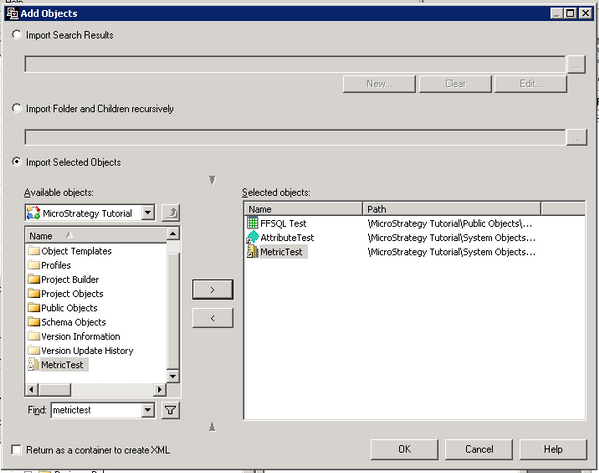
In order for the changes to the managed objects to be reflected in the target environment after the report was initially migrated, users must create a package and manually add the managed objects to the package as seen below. After selecting all of the objects, add all used dependencies, choose Replace for the Action field for the objects, and create the package. Once this package is imported into the target project, the changes made to the managed objects will be reflected.