EducationSoftwareStrategy.com
StrategyCommunity

Knowledge Base

Product

Community

Knowledge Base

TopicsBrowse ArticlesDeveloper Zone

Product

Download SoftwareProduct DocumentationSecurity Hub

Education

Tutorial VideosSolution GalleryEducation courses

Community

GuidelinesGrandmastersEvents
x_social-icon_white.svglinkedin_social-icon_white.svg
Strategy logoCommunity

© Strategy Inc. All Rights Reserved.

LegalTerms of UsePrivacy Policy
  1. Home
  2. Topics

KB32323: New feature in MicroStrategy Desktop: Custom Group banding type "Band for each distinct metric value"


Community Admin

• Strategy


New feature in MicroStrategy Desktop: Custom Group banding type "Band for each distinct metric value".

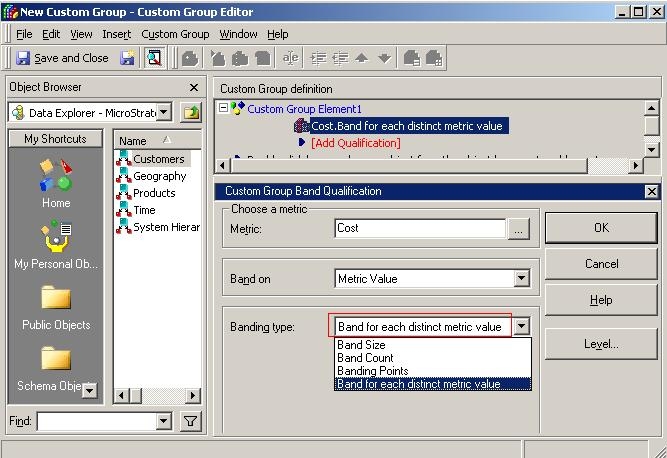
The new custom group banding type "Band for each distinct metric value" is introduced in Strategy Desktop 9.0.0, as shown below:


ka04W000000uGFRQA2_0EM440000002EDK.jpeg

 
The banding type "Band for each distinct metric value" is used to create a separate band for each value calculated by the metric. This type of banding qualification directly uses the results of a metric as bands. It is very useful with metrics that already contain the logic needed to calculate sequential band numbers.
 
Usage of this banding type is explained below in Strategy Tutorial project:
 

  1. In Desktop, create a metric "Tiers of Revenue" with formula: Case((Revenue < 1000000), 3, (Revenue > 7000000), 1, 2);
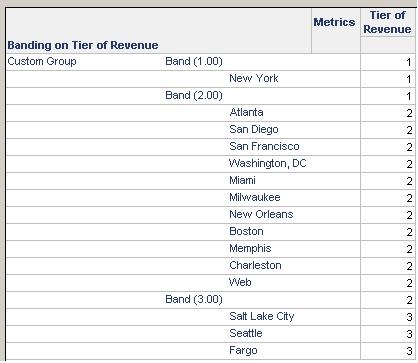
  2. Create a custom group banding on metric "Tiers of Revenue" and banding type "Band for each distinct metric value" and output level Call Center;
  3. Create a report, add the custom group in rows and the metric "Tier of Revenue" in columns;
  4. Execute the report, the bands are generated without knowing the range of metric value, as shown below:
ka04W000000uGFRQA2_0EM440000002EDI.jpeg


KB32323


Comment

0 comments

Details

Knowledge Article

Published:

April 11, 2017

Last Updated:

January 3, 2019