In Strategy SQL Generation Engine, it is not possible to use element list prompts in database passthrough functions, using the default syntax, such as ApplySimple, ApplyComparison and ApplyAgg. Strategy Developer allows expressions to be created where an element list prompts is one of the arguments to a passthrough function; however, default placeholder syntax causes the prompt to be replaced by the complete filtering expression " in (element list)."
A common use case is a filter qualification based on ApplyComparison, where the custom SQL string includes a subquery:
ApplyComparison("#0 in (select month_id from lu_month where month_id >= #1)", Month@ID, ?[PromptName])
After being answered, the month prompt would resolve as SQL such as the following:
a11.MONTH_ID in (200804)
Substituting this into the ApplyComparison string produces a syntactically incorrect condition:
a11.MONTH_ID in (select month_id from lu_month where month_id >= a11.MONTH_ID in (200804))
Note that the correct SQL could be obtained by using a value prompt instead of an element list prompt. This can impair usability for end-users, however, who would have to know the IDs and be able to type them by hand. The desired workflow is to allow the users to choose elements from a list, and then embed the element IDs only into the passthrough string.
In Strategy SQL Generation Engine the correct syntax can be obtained by writing the placeholder for the prompt as #Ex, where x is the placeholder number counted in the same way as the standard #x placeholder.
EXAMPLE
In Strategy, a report may be designed as follows:
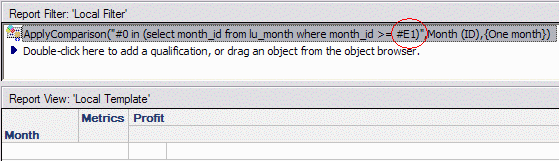
The qualification is written as follows:
ApplyComparison ("#0 in (select month_id from lu_month where month_id >= #E1)", Month@ID, ?[PromptName])
After answering the prompt with April 2008, the report generates the following SQL:
select a11.MONTH_ID MONTH_ID,
max(a12.MONTH_DESC) MONTH_DESC0,
sum((a11.TOT_DOLLAR_SALES - a11.TOT_COST)) WJXBFS1
from MNTH_CATEGORY_SLS a11
join LU_MONTH a12
on (a11.MONTH_ID = a12.MONTH_ID)
where a11.MONTH_ID in (select month_id from lu_month where month_id >= 200804)
group by a11.MONTH_ID
NOTES
