EducationSoftwareStrategy.com
StrategyCommunity

Knowledge Base

Product

Community

Knowledge Base

TopicsBrowse ArticlesDeveloper Zone

Product

Download SoftwareProduct DocumentationSecurity Hub

Education

Tutorial VideosSolution GalleryEducation courses

Community

GuidelinesGrandmastersEvents
x_social-icon_white.svglinkedin_social-icon_white.svg
Strategy logoCommunity

© Strategy Inc. All Rights Reserved.

LegalTerms of UsePrivacy Policy
  1. Home
  2. Topics

KB323876: The MicroStrategy installer and Windows Programs and Features show garbled Japanese characters when installing MicroStrategy 10.3 Hotfix 2


Community Admin

• Strategy


SYMPTOM
When installing Strategy 10.3 Hotfix 2 on a Japanese Windows OS, users may notice that the installer shows garbled characters in some pages as follows:
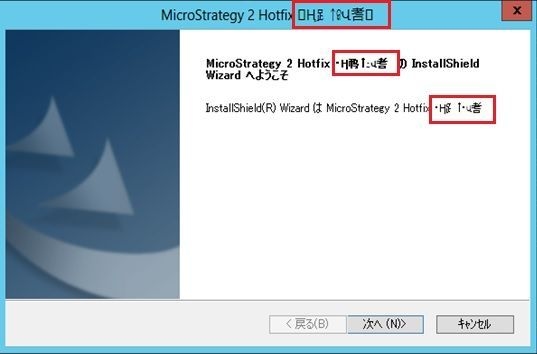
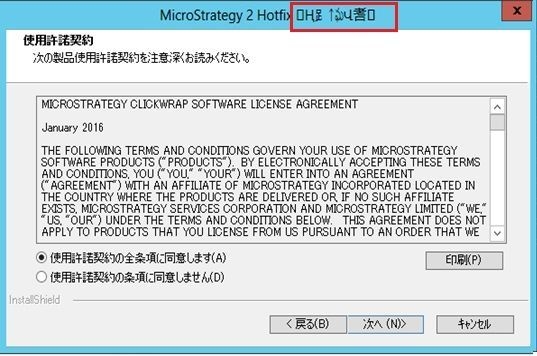
ka04W000000OfwcQAC_0EM440000002WiS.jpeg
ka04W000000OfwcQAC_0EM440000002Wia.jpeg


After the installation, Windows Programs and Features also shows some garbled characters.
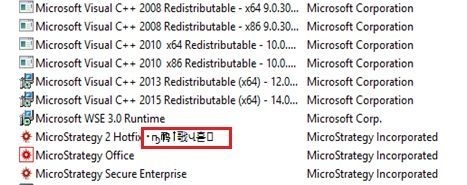
ka04W000000OfwcQAC_0EM440000002WiU.jpeg


CAUSE
This is a known issue in Strategy 10.3 Hotfix 2.
 
ACTION
This is a cosmetic issue and there should not be any impacts in terms of the software functionality. Hence, no action is needed and users can continue using the software after the installation. The display issue is not seen in Strategy versions 10.4.x and higher. 
 
The Strategy Internal Reference Number for the issue discussed in this technical note is DE53993.


Comment

0 comments

Details

Knowledge Article

Published:

July 17, 2017

Last Updated:

July 17, 2017