EducationSoftwareStrategy.com
StrategyCommunity

Knowledge Base

Product

Community

Knowledge Base

TopicsBrowse ArticlesDeveloper Zone

Product

Download SoftwareProduct DocumentationSecurity Hub

Education

Tutorial VideosSolution GalleryEducation courses

Community

GuidelinesGrandmastersEvents
x_social-icon_white.svglinkedin_social-icon_white.svg
Strategy logoCommunity

© Strategy Inc. All Rights Reserved.

LegalTerms of UsePrivacy Policy
  1. Home
  2. Topics

KB323881: How to specify the partition attribute and the number of partitions for Intelligent Cubes in MicroStrategy Secure Enterprise?


Community Admin

• Strategy


How to specify the partition attribute and the number of partitions for Intelligent Cubes.

SUMMARY
Strategy PRIME is a new feature added to the Strategy 10 Secure Enterprise Platform. This technical note will describe the steps to specify the partition attribute and the number of partitions in a regular Intelligent Cube and an in-memory Intelligent Cube created via Data Import. Check KB221530: MicroStrategy PRIME overview for MicroStrategy 10 Secure Enterprise Platform for more information regarding Strategy PRIME.
 
In-Memory Intelligent Cube created via Data Import
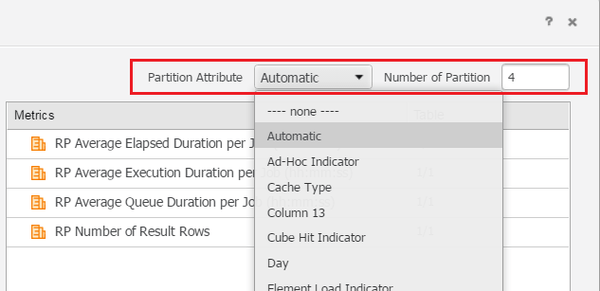
  • In Strategy Web, edit the Cube where users want to enable partitioning. 
  • Click “All Objects View”.
  • In the user interface, specify the partition attribute and the number of partition    

ka04W00000148PVQAY_0EM44000000298E.jpeg

 
Regular Intelligent Cubes created on Developer
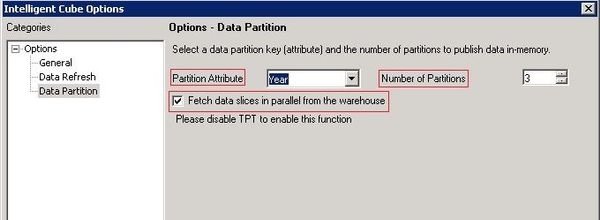
  • In Strategy Developer, edit the Intelligent Cube where users want to enable partitioning.
  • From the Data menu, select 'Configure Intelligent Cube'. 
  • In the options dialog, select the Data Partition category and the Data Partition options are displayed.
  • From the Partition Attribute drop-down, select the partition attribute for the Intelligent Cube.
  • In the number of Partitions field, type the number of partitions to create.
  • If the data warehouse supports parallel SQL queries, enable the Fetch data slices in parallel from the warehouse check box.

ka04W00000148PVQAY_0EM44000000298D.jpeg

The option "Fetch data slices in parallel from the warehouse" will change the final pass queries as demonstrated below for a simple case:  
Option Disabled 


select	a11.YYYY_ID  YYYY_ID,
	max(a12.YYYY_Desc)  YYYY_Desc,
	sum(a11.profit)  WJXBFS1
from	MDI_Fact	a11
	join	MDI_LU	a12
	  on 	(a11.YYYY_ID = a12.YYYY_ID)
group by	a11.YYYY_ID

 
Option Enabled 

select	a11.YYYY_ID  YYYY_ID,
	max(a12.YYYY_Desc)  YYYY_Desc,
	sum(a11.profit)  WJXBFS1
into T68P1S1L6MD000
from	MDI_Fact	a11
	join	MDI_LU	a12
	  on 	(a11.YYYY_ID = a12.YYYY_ID)
group by	a11.YYYY_ID 

select	pa11.YYYY_ID  YYYY_ID,
	pa11.YYYY_Desc  YYYY_Desc,
	pa11.WJXBFS1  WJXBFS1
from	T68P1S1L6MD000	pa11
where	(ABS(pa11.YYYY_ID)-FLOOR((ABS(pa11.YYYY_ID))/NULLIF(3, 0))*(3)) = 2

select	pa11.YYYY_ID  YYYY_ID,
	pa11.YYYY_Desc  YYYY_Desc,
	pa11.WJXBFS1  WJXBFS1
from	T68P1S1L6MD000	pa11
where	(ABS(pa11.YYYY_ID)-FLOOR((ABS(pa11.YYYY_ID))/NULLIF(3, 0))*(3)) = 1

select	pa11.YYYY_ID  YYYY_ID,
	pa11.YYYY_Desc  YYYY_Desc,
	pa11.WJXBFS1  WJXBFS1
from	T68P1S1L6MD000	pa11
where	(ABS(pa11.YYYY_ID)-FLOOR((ABS(pa11.YYYY_ID))/NULLIF(3, 0))*(3)) = 0

drop table T68P1S1L6MD000


Comment

0 comments

Details

Knowledge Article

Published:

June 7, 2017

Last Updated:

June 7, 2017