SYMPTOM
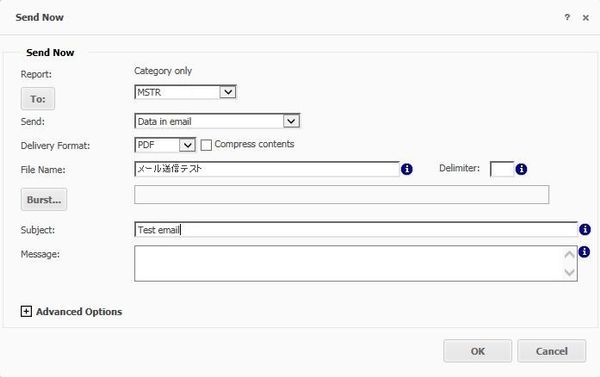
Users may notice that Strategy Distribution Services 10.x sends a PDF file with an incorrect file name in an email. The issue may only be seen with some mailer clients.
STEPS TO REPRODUCE
CAUSE
This is caused because the missing character “ス” is presented in two lines in the MIME message header.
This can be checked by reviewing the corresponding .eml file after enabling “Save to file” under Administration -> Delivery Managers -> Transmitters -> Message Output. When opening the .eml file in a text editor, users can see the following information regarding the PDF file
--_=_MSTRSMTP17B7997942C9F53BB9ED0E9E299F997C
Content-Type: application/pdf
Content-ID: <メール送信テスト.pdf>
Content-Transfer-Encoding: Base64
Content-Disposition: Attachment;
     Filename="
 =?utf-8?Q?=E3=83=A1=E3=83=BC=E3=83=AB=E9=80=81=E4=BF=A1=E3=83=86=E3=82?=
 =?utf-8?Q?=B9=E3=83=88=2Epdf?="

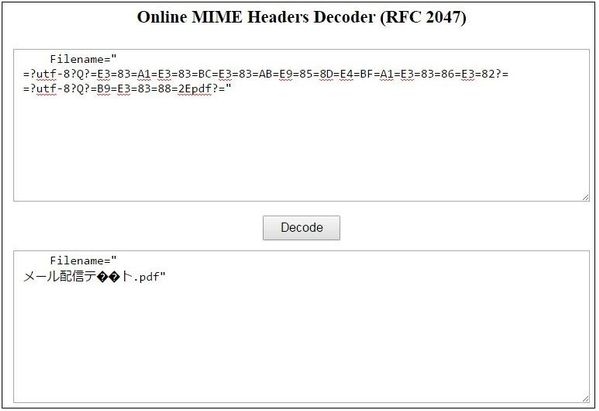
If the above header is decoded using the online decoding site, the character is also garbled as shown below
If the E382B9 is presented in one line, the expected file name will be displayed
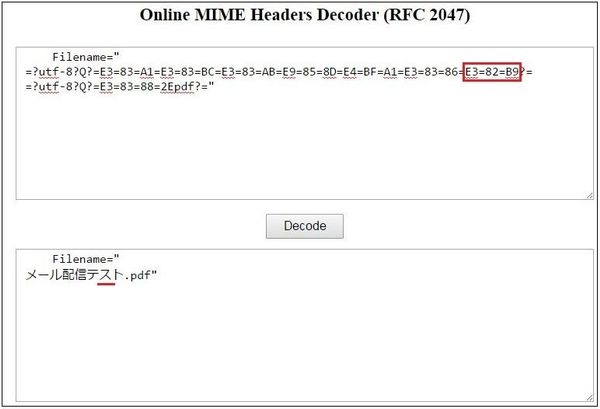
Strategy meets the universal standard as symbol \r\n is inserted in the middle of the filename.
Here is a quote from RFC2047:
"An 'encoded-word' may not be more than 75 characters long, including
'charset', 'encoding', 'encoded-text', and delimiters. If it is
desirable to encode more text than will fit in an 'encoded-word' of
75 characters, multiple 'encoded-word's (separated by CRLF SPACE) may
be used."
According to the above statement, the issue is outside Strategy and is a limitation of IBM Notes client instead.
Third Party Software Installation:
WARNING:
The third-party product(s) discussed in this technical note is manufactured by vendors independent of Strategy. Strategy makes no warranty, express, implied or otherwise, regarding this product, including its performance or reliability.
