SYMPTOM:
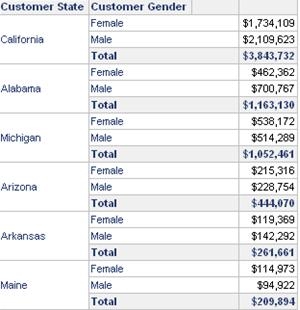
Users may observer that when creating a report that contains advance sorting with a metric that contains subtotals the report results appear to be only sorted by the metric values specified. Even if a sort is specified for the attribute elements on the report, the results in the report appear as if the attribute sort was not defined.
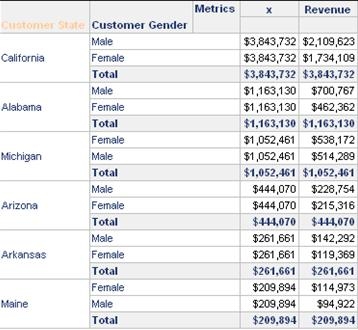
In the screenshot below, the results for a report are shown where the Advance Sorting option 'Sort metrics hierarchically using: Total' is selected. For this report, a second sort is defined on the Customer Gender - 'DESC' form, users would notice that the ordering of the this attribute is not consistent:
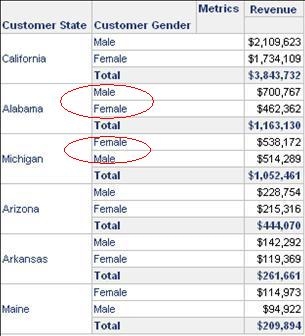
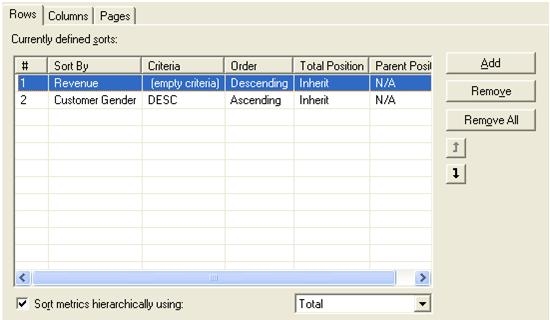
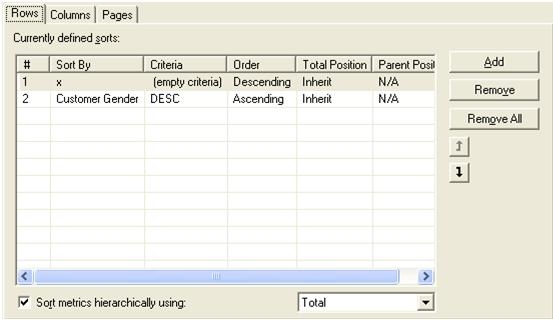
The sort definition for the report is shown below:
CAUSE:
When the option to 'Sort metrics hierarchically using: Total' option is selected, the Strategy Engine first sorts the results based on the Total values, and then sorts the non-total metric values within each total. Because the sort order for the non-total metric values has a higher precedence than the attribute form sort defined, the results are displayed as observed above.
An underlying problem with the current product design is there is no way to inform the Strategy Engine that a sort for the non-total metric values is not desired, even though such a sort is indeed possible.
ACTION:
This is the behavior expected for metric sorting as any metric sort will sort for all rows with a metric value
WORKAROUND:
To allow sorting on the attribute elements after sorting by the metric total value, users may follow the steps below:
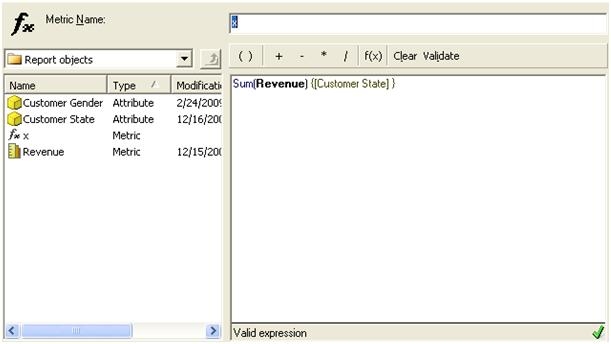
The final report with the correct sorting of the attribute is shown below: