EducationSoftwareStrategy.com
StrategyCommunity

Knowledge Base

Product

Community

Knowledge Base

TopicsBrowse ArticlesDeveloper Zone

Product

Download SoftwareProduct DocumentationSecurity Hub

Education

Tutorial VideosSolution GalleryEducation courses

Community

GuidelinesGrandmastersEvents
x_social-icon_white.svglinkedin_social-icon_white.svg
Strategy logoCommunity

© Strategy Inc. All Rights Reserved.

LegalTerms of UsePrivacy Policy
  1. Home
  2. Topics

KB32426: When exporting a report with dates to Excel with formatting, any date value prior to the year 1900 displays as pound (#) signs in MicroStrategy 9.0.x.


Community Admin

• Strategy


SYMPTOM:
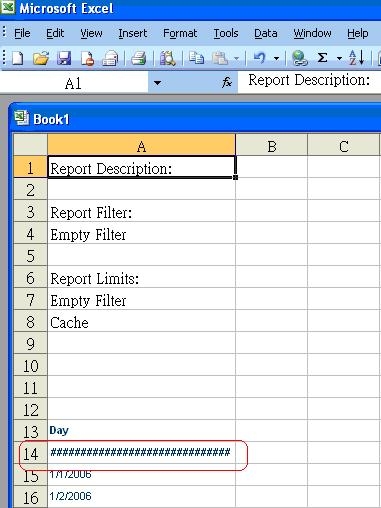
When exporting date to Excel with formatting, some dates do not display correctly and just display pound (#) signs.
 
STEPS TO REPRODUCE:

  • In Strategy Tutorial Reporting warehouse, create an entry in the LU_DAY table for 1775/01/01.
  • Create a report with the Day attribute only and execute the report. The report should look like the following.
     
ka04W000000OcV1QAK_0EM44000000285g.jpeg
  • Export the report to excel with formatting. Note that the entry for 1775/01/01 is been replaced by pound signs: "###################".
     
ka04W000000OcV1QAK_0EM44000000285d.jpeg
  • The issue persists if the user exports the report through either  Strategy Desktop or Web 9.0.0. 

CAUSE:
This is a limitation with Excel, where the earliest date that Excel recognizes is 1/1/1900.  See the following Microsoft knowledge base article for more information on the Excel date system:  http://support.microsoft.com/kb/214330.
 
ACTION:
If a date before 1/1/1900 is required to be exported, choose to export the report headers as text.  This will populate the cell in Excel with a date String rather than a numeric date, thus Excel will not attempt to associate it with the date system format.


Comment

0 comments

Details

Knowledge Article

Published:

July 18, 2017

Last Updated:

July 18, 2017