SYMPTOM:
In some instances, the below warning message is thrown by the web browser when executing documents containing ESRI maps. This has been seen when the web server is configured to use https. The image below is from Chrome; however, similar messages can be seen in other web browsers as well including Internet Explorer
This page is trying to load scripts from unauthorized sources.
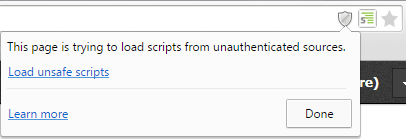
As stated in this article, this message is a browser warning and thus not a Strategy error.
STEPS TO REPRODUCE:
CAUSE:
The warning message appears because the web browser does not trust the ESRI address. One potential cause of this message appearing is the ESRI URLs use http while the web server uses https.
ACTION:
To avoid seeing the warning message, the esriConfig.xml file can be modified for the map server and map layer URLs to use https rather than http. Note that these URLs are in the esriCongif.xml file located at MSTR_Web_Installation\WEB-INF\xml\config. The esriConfig.xml file in the plugins folder does not contain the URLs for the map server and map layers.
After making these changes, restart the web server and clear browser caches for the changes to take effect.
KB324297
