SYMPTOM:
A file attachment in an email generated by Strategy Narrowcast Server 9.x - 10.x is delivered as "C.dtf" instead of the correct name and extension. This issue is only specific to some e-mail addresses, as sending the same e-mail through Strategy Narrowcast Server 9.x - 10.x to a different address shows the correct attachment name.
CAUSE:
The attachment is renamed by the mail server of the destination e-mail address as the name contains an unsupported character. One potential reason that a mail server will do this is that it does not support an specific character encoding.
This has been seen more frequently with Lotus Notes mail clients, however the issue is not specific to this provider.
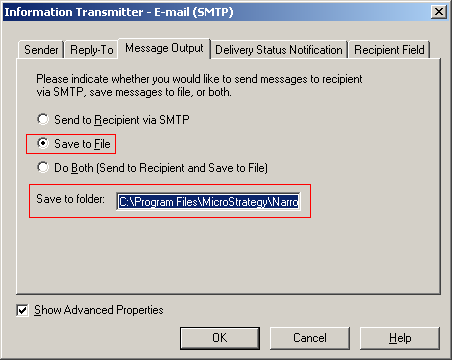
The actual file name specified for the attachment can be checked in the MIME code of the e-mail generated by Strategy Narrowcast Server 9.x - 10.x. The e-mail files are saved to the location specified in the Information Transmitter, as shown below:
The saved e-mails will have a .eml extension. Opening the file with a text editor will show the attachment name, as well as the encoding format. The following shows what a UTF-8 encoding looks like:
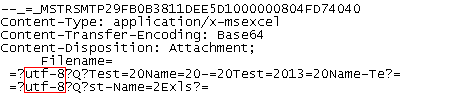
--_=_MSTRSMTP29FB0B3811DEE5D1000000804FD74040
Content-Type: application/x-msexcel
Content-Transfer-Encoding: Base64
Content-Disposition: Attachment;
     Filename=
 =?utf-8?Q?Test=20Name=20-=20Test=2013=20Name-Te?=
 =?utf-8?Q?st-Name=2Exls?=
