With Strategy OLAP Services, transformation metrics used in standard reports can resolve against Intelligent Cubes under the following conditions:
For instance, a simple Intelligent Cube may be defined as follows.

Provided that the Dynamic Sourcing properties under Data > Configure Intelligent Cube are correctly set (and, if necessary, outer join properties), as described in the Strategy OLAP Services Guide, a standard report including the Month attribute and the two metrics from the cube can retrieve its data from the Intelligent Cube.

The report's SQL view shows that the report is using the Intelligent Cube, because it presents a Cube Subsetting Instruction rather than SQL syntax.
Intelligent Cube SQL Statements:
select [Month]@[MONTH_ID],
[Month]@[MONTH_DESC],
sum([Revenue])@{[Month]} as [Revenue],
sum([Previous Period Revenue])@{[Month]} as [Previous Period Revenue]
from Cube with transformation
where [Quarter]@[QUARTER_ID] in (20071, 20072, 20073, 20074)
having ([Revenue] is not null
and [Previous Period Revenue] is not null)
Dynamic Sourcing matches metrics by formula, not by ID. A transformation metric inserted into a report on-the-fly can thereby use Intelligent Cube data if all the prerequisite conditions are met. As illustrated below, a user could create a report containing Month and Revenue, and then right-click on Revenue > Insert Metric > Transformation > Previous > Normal to add the previous period's revenue to the report.

The resulting transformation is a sum of revenue using the Previous transformation, which matches the transformation metric in the cube, and the user report is at the same Time level as the cube. The report matches the cube and the engine generates a Cube Subsetting Instruction.
select [Month]@[MONTH_ID],
[Month]@[MONTH_DESC],
sum([Revenue])@{[Month]} as [Revenue],
sum([Previous Period Revenue])@{[Month]} as [Previous (Revenue)]
from Cube with transformation
where [Quarter]@[QUARTER_ID] in (20071, 20072, 20073, 20074)
having ([Revenue] is not null
and [Previous (Revenue)] is not null)

Problems with aggregation over the transformation's hierarchy
Cube subsetting works by "second aggregating" over previously aggregated data. That is, the above cube aggregates its metrics to the level of Month and Category. A report at Quarter level must aggregate those results a second time, over the Category and Month values within each quarter.
For transformations, many cases exist where second aggregation up to a parent of the transformation attribute is invalid. In a many-to-many transformation such as month-to-date, for instance, the base SQL result includes the same Day level value in multiple rows:
terminate instancename <cache folder path> is not a directory, or not readable or not writeable.0x80041903No cache data available for this report.0x80041E03ReportCacheManager failed to load the cache file0x80041E0BThe cache directory for one of the projects could not be created. The location specified could be inaccessible or the path specified could be incorrect.0x80041E0CReportCacheManager failed to get the current directory0x80041E0DReportCacheManager failed to create cache file0x80041E10ReportCacheManager failed to save cache to file0x80041E18adding result to the cachepool failed0x800438F2Cache Administration operation failed.0x800039CAMsiUserInBox: Failed to persist the results of this message. Please check that the cache configuration is proper and that the history list directory as specified in the server definition exists on the Intelligence Server machine.1/1/2009M(1/1/2009)1/2/2009M(1/1/2009) + M(1/2/2009)1/3/2009M(1/1/2009) + M(1/2/2009) + M(1/3/2009) | terminate instancename <cache folder path> is not a directory, or not readable or not writeable.0x80041903No cache data available for this report.0x80041E03ReportCacheManager failed to load the cache file0x80041E0BThe cache directory for one of the projects could not be created. The location specified could be inaccessible or the path specified could be incorrect.0x80041E0CReportCacheManager failed to get the current directory0x80041E0DReportCacheManager failed to create cache file0x80041E10ReportCacheManager failed to save cache to file0x80041E18adding result to the cachepool failed0x800438F2Cache Administration operation failed.0x800039CAMsiUserInBox: Failed to persist the results of this message. Please check that the cache configuration is proper and that the history list directory as specified in the server definition exists on the Intelligence Server machine.1/1/2009M(1/1/2009)1/2/2009M(1/1/2009) + M(1/2/2009)1/3/2009M(1/1/2009) + M(1/2/2009) + M(1/3/2009) |
terminate instancename <cache folder path> is not a directory, or not readable or not writeable.0x80041903No cache data available for this report.0x80041E03ReportCacheManager failed to load the cache file0x80041E0BThe cache directory for one of the projects could not be created. The location specified could be inaccessible or the path specified could be incorrect.0x80041E0CReportCacheManager failed to get the current directory0x80041E0DReportCacheManager failed to create cache file0x80041E10ReportCacheManager failed to save cache to file0x80041E18adding result to the cachepool failed0x800438F2Cache Administration operation failed.0x800039CAMsiUserInBox: Failed to persist the results of this message. Please check that the cache configuration is proper and that the history list directory as specified in the server definition exists on the Intelligence Server machine.1/1/2009M(1/1/2009)1/2/2009M(1/1/2009) + M(1/2/2009)1/3/2009M(1/1/2009) + M(1/2/2009) + M(1/3/2009) | terminate instancename <cache folder path> is not a directory, or not readable or not writeable.0x80041903No cache data available for this report.0x80041E03ReportCacheManager failed to load the cache file0x80041E0BThe cache directory for one of the projects could not be created. The location specified could be inaccessible or the path specified could be incorrect.0x80041E0CReportCacheManager failed to get the current directory0x80041E0DReportCacheManager failed to create cache file0x80041E10ReportCacheManager failed to save cache to file0x80041E18adding result to the cachepool failed0x800438F2Cache Administration operation failed.0x800039CAMsiUserInBox: Failed to persist the results of this message. Please check that the cache configuration is proper and that the history list directory as specified in the server definition exists on the Intelligence Server machine.1/1/2009M(1/1/2009)1/2/2009M(1/1/2009) + M(1/2/2009)1/3/2009M(1/1/2009) + M(1/2/2009) + M(1/3/2009) |
terminate instancename <cache folder path> is not a directory, or not readable or not writeable.0x80041903No cache data available for this report.0x80041E03ReportCacheManager failed to load the cache file0x80041E0BThe cache directory for one of the projects could not be created. The location specified could be inaccessible or the path specified could be incorrect.0x80041E0CReportCacheManager failed to get the current directory0x80041E0DReportCacheManager failed to create cache file0x80041E10ReportCacheManager failed to save cache to file0x80041E18adding result to the cachepool failed0x800438F2Cache Administration operation failed.0x800039CAMsiUserInBox: Failed to persist the results of this message. Please check that the cache configuration is proper and that the history list directory as specified in the server definition exists on the Intelligence Server machine.1/1/2009M(1/1/2009)1/2/2009M(1/1/2009) + M(1/2/2009)1/3/2009M(1/1/2009) + M(1/2/2009) + M(1/3/2009) | terminate instancename <cache folder path> is not a directory, or not readable or not writeable.0x80041903No cache data available for this report.0x80041E03ReportCacheManager failed to load the cache file0x80041E0BThe cache directory for one of the projects could not be created. The location specified could be inaccessible or the path specified could be incorrect.0x80041E0CReportCacheManager failed to get the current directory0x80041E0DReportCacheManager failed to create cache file0x80041E10ReportCacheManager failed to save cache to file0x80041E18adding result to the cachepool failed0x800438F2Cache Administration operation failed.0x800039CAMsiUserInBox: Failed to persist the results of this message. Please check that the cache configuration is proper and that the history list directory as specified in the server definition exists on the Intelligence Server machine.1/1/2009M(1/1/2009)1/2/2009M(1/1/2009) + M(1/2/2009)1/3/2009M(1/1/2009) + M(1/2/2009) + M(1/3/2009) |
Further aggregation in the Analytical Engine would produce a total (just considering these three rows) where the value for 1/1/2009 is counted three times, 1/2/2009 is counted twice, and 1/3/2009 is counted once. The second-aggregated result will be too large.
A transformation such as Previous in the Strategy Tutorial project is also not valid for second aggregation over Time, even though it is one-to-one. This is because the time offset is different for each level. Day-level results are shifted by one day, Month-level results by one month and so on.
If a user builds a report at Quarter level with the metrics Revenue and Previous Period Revenue, she would expect Previous Period Revenue for Q2 to equal Revenue for Q1. The transformation metric shifts the data by one Quarter, or three months.
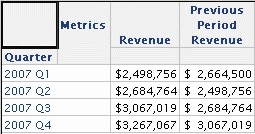
The data for Previous Period Revenue in the example Intelligent Cube are shifted by one month. Rolling the cube data up to Quarter, then, would sum the data from March-May 2007 to produce the value for 2007 Q2, where the previous quarter would actually be January-March. That result would appear as follows, where Previous Period Revenue for 2007 Q2 does not equal current Revenue for 2007 Q1.

Because data consistency cannot be guaranteed when aggregating a transformation metric over the hierarchy used in the transformation, any standard report attempting to do so will not match Intelligent Cubes based on a lower-level attribute in the time hierarchy. They will generate SQL and run against the warehouse.
For the Quarter-level report to use Intelligent Cube data for transformations, there should be an Intelligent Cube containing the transformation metric(s) where Quarter is the lowest level time attribute.
This restriction does not affect attributes unrelated to the transformation hierarchy. In these examples, the Intelligent Cube includes the Category attribute, but none of the user reports include this attribute. The Month-level report without Category does not aggregate over Month and can thereby use the transformation metric data in the cube. It does aggregate over Category, but this aggregation does not affect the transformation and thereby does not prevent the Intelligent Cube from being used for that metric.
Metrics without transformations can be retrieved from Intelligent Cubes at any level, even if the cube includes a transformation metric as well.
For more information on Dynamic Sourcing, consult the Strategy OLAP Services Guide product manual, Chapter 8: Dynamic Sourcing.
