The Dynamic Sourcing feature in Strategy OLAP Services 9.x-10.x improves the performance of user reports by executing reports against published Intelligent Cubes, when the SQL generation engine is able to determine that the cube contains all information required for the report. Instead of always executing against the data warehouse, reports may be "dynamically sourced" against Intelligent Cubes.
For successful Dynamic Sourcing, the engine must be sure that the Intelligent Cube data are complete, and that the user's report will obtain the same results against the Intelligent Cube as it would from the warehouse. Both the Intelligent Cubes and the user reports are analyzed according to a number of criteria, which are described in more detail in the OLAP Services Guide product manual, Chapter 8, "Dynamic Sourcing."
The analysis is captured in Strategy diagnostic logs, under the Dynamic Sourcing component. In all Strategy 9.x versions, these messages may be logged to a file on the Intelligence Server machine using the Strategy Diagnostics and Performance Logging tool:

This can be inconvenient when reports do not hit Intelligent Cubes, because the report designer will need to have access to the log file on the Intelligence Server machine.
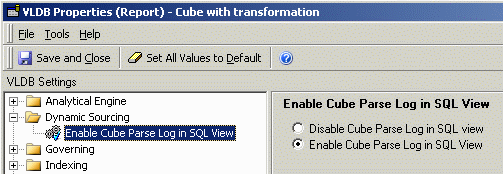
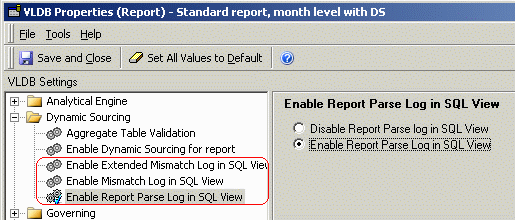
Beginning with Strategy 9.0.1, VLDB properties may be enabled in Intelligent Cube reports and user reports to include Dynamic Sourcing diagnostic messages in SQL View. Report designers can then view the messages immediately without accessing the Intelligence Server machine.
In an Intelligent Cube report, the following log is available for SQL View:
In user reports, the following logs are available for SQL View:
If the Cube Parse Log is enabled in SQL View and the Intelligent Cube is fully available for Dynamic Sourcing, the following will be seen at the bottom of the cube report's SQL View:
Dynamic Sourcing Logs:
Cube Parse Log:
Intelligent Cube is eligible for Dynamic Sourcing
The Cube Parse Log may identify reasons why the cube, or certain metrics within the cube, are not available for Dynamic Sourcing. Here, one of the required outer join properties was not configured:
Sample Code/Error
Cube Parse Log:
Intelligent Cube is ineligible for Dynamic Sourcing
CMI_VLDB_INCOMPLETE_LOOKUP_PROBLEM
_______________________________________________________________
Error code legend:
CMI_VLDB_INCOMPLETE_LOOKUP_PROBLEM - The Intelligent Cube cannot be used for dynamic sourcing because of lookup table problems. Intelligent Cubes of this type can be made available for dynamic sourcing by performing one of the following actions: Selecting the Allow dynamic sourcing even if outer join properties are not set option for an Intelligent Cube. Selecting the Preserve all final pass result elements option for the Preserve all final result pass elements VLDB Property.
The report parse log lists any reasons why a report cannot use dynamic sourcing. When a report that can use dynamic sourcing is executed and Intelligent Cubes are available for dynamic sourcing, information about whether a matching Intelligent Cube can be found for the report is included in the mismatch log. This log lists any reasons why a report cannot use a specific Intelligent Cube to satisfy its data requirements. The extended mismatch log provides more details on why a report cannot be matched to a specific cube by breaking the analysis down at the object level.
To illustrate report parsing and mismatch messages, consider an Intelligent Cube containing the Month attribute and Revenue metric. If a user report includes Month, Revenue and Profit, the three logs together produce the following messages, explaining that Profit in the user report could not be found in any eligible cube.
Dynamic Sourcing Logs:
Report Parse Log:
Report is eligible for Dynamic Sourcing
_______________________________________________________________
Mismatch Log:
The report parsed OK, but no cubes were found to match
________________________
Could not use cube: Cube with transformation Error:
Report Metric vs Cube checks failed.
Error code: CMI_NO_GOOD_CANDIDATE_METRICS_FOUND
_______________________________________________________________
Extended Mismatch Log:
The report parsed OK, but no cubes were found to match
________________________
Could not use cube: Cube with transformation Error:
Report Metric vs Cube checks failed.
Error code: CMI_NO_GOOD_CANDIDATE_METRICS_FOUND
Report Metric: Profit Cube: Cube with transformation
Metric Vs Metric Matching Log:
Report Metric vs Cube Metric checks failed.
Error Code: CMI_DIFFERENT_METRIC_FORMULA
Report Metric: Profit Cube Metric: Revenue Cube: Cube with transformation
Report Metric vs Cube Metric checks failed.
Error Code: CMI_DIFFERENT_METRIC_FORMULA
Report Metric: Profit Cube Metric: Previous Period Revenue Cube: Cube with transformation
_______________________________________________________________
Error code legend:
CMI_NO_GOOD_CANDIDATE_METRICS_FOUND - We did not find an appropriate metric in the cube for the current report metric. Please refer to the extended mismatch log for a detailed comparison
CMI_DIFFERENT_METRIC_FORMULA - This error signifies that, due to differing metric formulas, a metric in an Intelligent Cube is not a match for a metric on a report. All metrics on an Intelligent Cube are checked to determine if they are a match for a metric on a report. This process is done until a match is found, or no match is found and dynamic sourcing is not used (finding no matches for a metric returns the error CMI_NO_GOOD_CANDIDATE_METRICS_FOUND).
These VLDB properties are also available at project level, to configure the project-wide default behavior. To access the properties, go to Project Configuration > Project Definition > Advanced and click on the "Configure" button for Analytical Engine VLDB properties. The properties are under the Dynamic Sourcing folder. Logging in SQL View introduces some overhead; use caution when enabling these properties at project level.
Note: The Extended Mismatch Log shows the metric-by-metric comparison of each metric in the user report against eligible metrics in all Intelligent Cubes that are available for Dynamic Sourcing. In busy production environments, this can generate a massive amount of output and add noticeable overhead to the SQL generation step. Because of the potential for performance degradation, Strategy recommends that the Extended Mismatch Log VLDB property should generally not be enabled at project level. It may be enabled on a per-report basis when troubleshooting specific reports that are not using Intelligent Cubes. After troubleshooting, it is recommended to disable the extended level of logging for normal report execution.
