EducationSoftwareStrategy.com
StrategyCommunity

Knowledge Base

Product

Community

Knowledge Base

TopicsBrowse ArticlesDeveloper Zone

Product

Download SoftwareProduct DocumentationSecurity Hub

Education

Tutorial VideosSolution GalleryEducation courses

Community

GuidelinesGrandmastersEvents
x_social-icon_white.svglinkedin_social-icon_white.svg
Strategy logoCommunity

© Strategy Inc. All Rights Reserved.

LegalTerms of UsePrivacy Policy
  1. Home
  2. Topics

KB325279: How to increase the Permgen space in Apache Tomcat server for MicroStrategy Web 10.x


Community Admin

• Strategy


How to increase the Permgen space in Apache Tomcat server for MicroStrategy Web 10.x

SYMPTOM: 
Strategy Web relies heavily on the JVM (Java Virtual Machine) to allocate memory resources and storing the classes and methods used to run Strategy Web. The default values that are used when deploying Strategy Web 10.x JSP may not be enough to handle the different environments (Dev vs. Prod), or the different workloads that each Administrator may need, and can sometimes lead to an error such as the following one:


<record>
 <package>com.Strategy.web.controller</package>
 <level>SEVERE</level>
 <miliseconds>1266853504793</miliseconds>
 <timestamp>02/22/2017 15:45:04:794</timestamp>
 <thread>3</thread>
 <class>GenericWebAppController</class>
 <method>processRequest</method>
 <message>PermGen space (java.lang.OutOfMemoryError)</message>
 <exception>java.lang.OutOfMemoryError: PermGen space
	at java.lang.Class.getDeclaredMethods0(Native Method)


ACTION:
Increase the Permgen space on the JVM that handles the Strategy Web 10.x application.
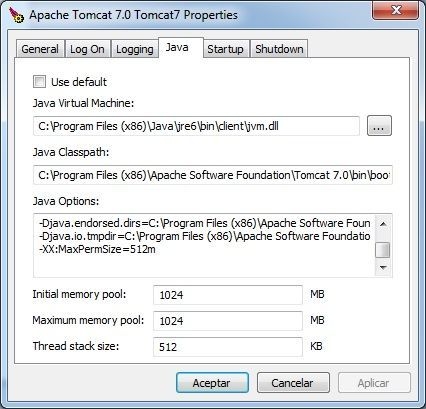
If using Tomcat 6 and above on a Windows machine, access the Apache Tomcat Monitor > Java, shown below:

ka04W000000Ofi8QAC_0EM440000002X5S.jpeg

Note where it says -XX:MaxPermSize=512M
Under Java Options, include the following statement:


-XX:MaxPermSize=512m

Change the value of 512m to a higher value that suits the needs of the environment. 
 
For more information on PermGen or how to modify this parameter from other Operating Systems, refer to the 3rd party vendor manuals. For Apache Tomcat in Linux, refer to the following article.
 
Third Party Software Installation Warning: 
The third-party product(s) discussed in this technical note are manufactured by vendors independent of Strategy. Strategy makes no warranty, express, implied or otherwise, regarding these products, including their performance or reliability.


Comment

0 comments

Details

Knowledge Article

Published:

August 7, 2017

Last Updated:

August 7, 2017