SYMPTOM
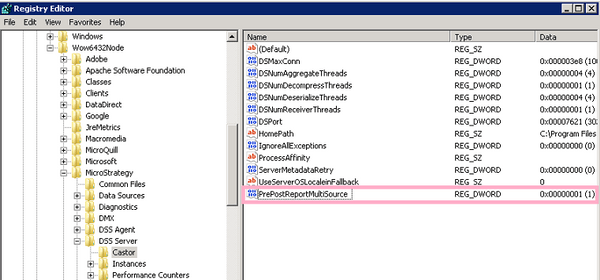
Note: Changing the registry to a value of 0 will have the report pre-sql applied to just the primary database instance. Prior to Strategy 10.7, pre-statements were applied only to the primary database instance. However, in later Strategy versions, the pre-statements are now applied by default to all database instances in multi-source reports. Per our testing, setting the value to 0 restores the earlier behavior (where report pre-statements only apply to the primary database instance).
In Strategy versions 9.4.1 - 10.5, when executing a multi-source report, the Report Pre/Post Statement VLDB setting is only inherited from the primary database instance
Suppose there are two database instances (DBI_A and DBI_B); in the primary database instance DBI_A, Pre-Report SQL is set to: “set current refresh age=any”
As given below, it is seen that the Report Pre/Post Statement VLDB setting defined on DBI_A gets applied to the report SQL passes that run against secondary database instance DBI_B as well. The expectation is that no Pre-Report SQL is executed against secondary database instance DBI_B as nothing was defined there.
Snippet from the multi-source report SQL is as below:
SQL Statements:

Pass0 - [DBI_A]
Query Execution: 0:00:00.00
Data Fetching and Processing: 0:00:00.00
Data Transfer from Datasource(s): 0:00:00.00
Other Processing: 0:00:00.02
set current refresh age=any

Pass1 - [DBI_B]
Query Execution: 0:00:00.24
Data Fetching and Processing: 0:00:00.00
Data Transfer from Datasource(s): 0:00:00.00
Other Processing: 0:00:00.47
set current refresh age=any


//Rest SQL passes all run against secondary DB Instance (DBI_B) only.
[HKEY_LOCAL_MACHINE\SOFTWARE\Wow6432Node\Strategy\DSS Server\Castor]
Linux/UNIX
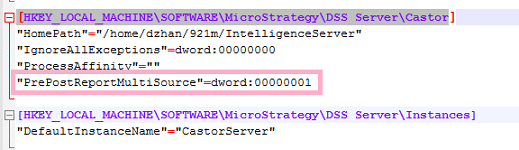
[HKEY_LOCAL_MACHINE\SOFTWARE\Strategy\DSS Server\Castor]
"PrePostReportMultiSource"=dword:00000001
The Strategy Internal Reference Number for the issue discussed in this article is DE25878.
Registry Modification:
WARNING:
Modifying registry values incorrectly may cause serious, system-wide problems that may require the re-installation of Microsoft Windows or Strategy installations on UNIX/Linux operating systems. Any edit of the registry is done at the user's own risk. Since these are user-initiated changes, they are not covered by any Strategy warranty. If using Microsoft Windows, the user should backup the registry and/or update an Emergency Repair Disk (ERD) prior to alterations.
