EducationSoftwareStrategy.com
StrategyCommunity

Knowledge Base

Product

Community

Knowledge Base

TopicsBrowse ArticlesDeveloper Zone

Product

Download SoftwareProduct DocumentationSecurity Hub

Education

Tutorial VideosSolution GalleryEducation courses

Community

GuidelinesGrandmastersEvents
x_social-icon_white.svglinkedin_social-icon_white.svg
Strategy logoCommunity

© Strategy Inc. All Rights Reserved.

LegalTerms of UsePrivacy Policy
  1. Home
  2. Topics

KB325502: “Error in Process method of Component... Error Code = -2147467261” error occurs when downloading a Visual Insight Dashboard with a Bar Chart and a trendline in MicroStrategy Web 10.4 ASP.NET


Community Admin

• Strategy


This technical note describes an error in MicroStrategy Web 10.4 ASP.NET when downloading a *.mstr file containing a Bar Chart with a trendline. The issue has been fixed in MicroStrategy Web 10.4 Hotfix 3. Apply the hotfix to take advantage of this fix.

SYMPTOM:
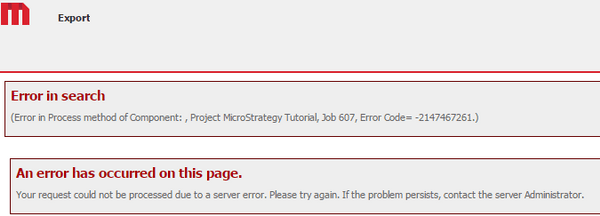
An easy way to share dashboards offline between users is to download an *.mstr file of the Visual Insight dashboard that can then later be used by Strategy Desktop users. However, in Strategy Web 10.4 ASP, when a user wants to download an *. mstr file for a dashboard that contains a Bar Chart with a trendline, the following error appears.
ka04W000000OfplQAC_0EM4400000025MQ.jpeg


Error in Search
(Error in Process method of Component: , Project xxx, Job xxx, Error Code= -2147467261.)

An error has occurred on this page.
Your request could not be processed due to a server error. Please try again. If the problem persists, contact the server Administrator.
 
STEPS TO REPRODUCE:
 Follow these steps to reproduce the issue in a Strategy Tutorial Project.

  • Create a new Visual Insight dashboard. 
  • Click "Create New Report" from the options on the left pane.
  • Add the Year attribute and the # of Customers metric. Then click Add.
  • Add Year to the rows and # of Customers to the columns.
  • Change the display to Bar Chart by clicking on the second visualization from the right.
  • Right-click the white space of the chart > Enable Trendline.
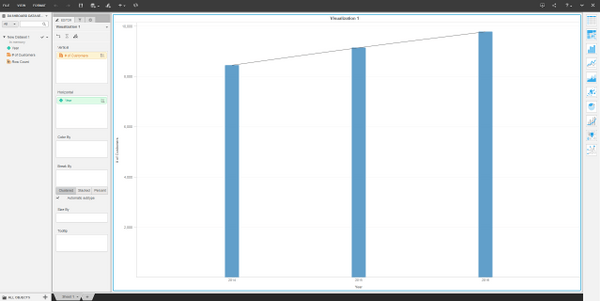
  • Save the dashboard; the final dashboard should look like the one shown below: 

ka04W000000OfplQAC_0EM4400000025MR.jpeg
  • From the File menu, click Download Dashboard. This is where the error appears.

CAUSE:
This is an identified defect in Strategy Web 10.4 ASP.
 
ACTION:
This issue has been addressed in Strategy Web 10.4 Hotfix 3 ASP. Upgrade to this version to take advantage of this fix.
 
WORKAROUND:
Instead of downloading the dashboard by going to File > Download Dashboard, folder browse to where the dashboard is saved, right-click, and select Download Dashboard.


Comment

0 comments

Details

Knowledge Article

Published:

June 6, 2017

Last Updated:

June 6, 2017