EducationSoftwareStrategy.com
StrategyCommunity

Knowledge Base

Product

Community

Knowledge Base

TopicsBrowse ArticlesDeveloper Zone

Product

Download SoftwareProduct DocumentationSecurity Hub

Education

Tutorial VideosSolution GalleryEducation courses

Community

GuidelinesGrandmastersEvents
x_social-icon_white.svglinkedin_social-icon_white.svg
Strategy logoCommunity

© Strategy Inc. All Rights Reserved.

LegalTerms of UsePrivacy Policy
  1. Home
  2. Topics

KB325658: “Pass all selector values” doesn’t work on iPhone against MicroStrategy Mobile 10.5


Community Admin

• Strategy


Selector values cannot be passed to the target report services document on iPhone against MicroStrategy Mobile 10.5 when the image in the source document has multiple links and “Pass all selector values” is not configured on the first link in Edit Links.

SYMPTOM:
Selector values cannot be passed to the target report services document on iPhone against Strategy Mobile 10.5 when the image in the source document has multiple links and “Pass all selector values” is not configured on the first link in Edit Links.
STEPS TO REPRODUCE:

  • Create a report services document “target” with an attribute selector “Category”.
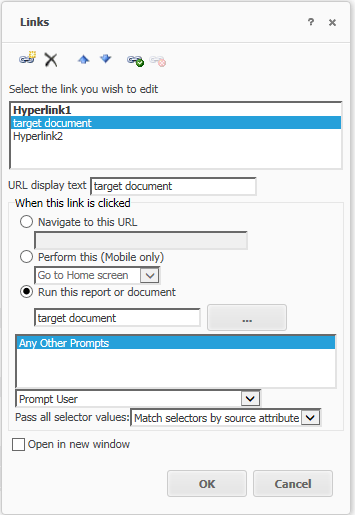
  • Create another document “source” with an attribute selector "Category" and an image with 3 links added through Edit Links. For the second link, select the target document created in step 1 and enable "Pass all selector values".
ka04W000000OdWZQA0_0EM4400000029n4.jpeg
  • Run the source document in Strategy Web and choose the second link on the image. The selector value can be passed to the target successfully.
  • Run the source document on iPhone against Strategy Mobile 10.5. The selector value cannot be passed to the target document.

ka04W000000OdWZQA0_0EM4400000029mw.jpeg

 
CAUSE:
This is a known issue of Strategy Mobile 10.5.
WORKAROUND:
Users can re-order the links in Edit Links and put the link with “Pass all selector values” enabled to the first one.
ACTION:
Strategy will continue to investigate and post updates as soon as thy are available.


Comment

0 comments

Details

Knowledge Article

Published:

April 13, 2017

Last Updated:

April 13, 2017