EducationSoftwareStrategy.com
StrategyCommunity

Knowledge Base

Product

Community

Knowledge Base

TopicsBrowse ArticlesDeveloper Zone

Product

Download SoftwareProduct DocumentationSecurity Hub

Education

Tutorial VideosSolution GalleryEducation courses

Community

GuidelinesGrandmastersEvents
x_social-icon_white.svglinkedin_social-icon_white.svg
Strategy logoCommunity

© Strategy Inc. All Rights Reserved.

LegalTerms of UsePrivacy Policy
  1. Home
  2. Topics

KB325669: Get Gateway files not found error in DSSErrors log when using push notification on mobile devices against MicroStrategy Mobile 10.6


Community Admin

• Strategy


After following the steps outlined in KB35792 - How to enable Alert Push Notification when using MicroStrategy Mobile 9.0.2 and later, no push notifications are received on the Mobile devices against MicroStrategy Mobile 10.6

SYMPTOM:
After following the steps outlined in KB35792 - How to enable Alert Push Notification when using Strategy Mobile 9.0.2 and later, no push notifications are received on the Mobile devices against Strategy Mobile 10.6. DSSErrors returns the following error message:
[Kernel][Error] Gateway files not found, report ID file path .\gatewayreport.ini, delta XML file path .\gatewaydelta.ini
CAUSE:
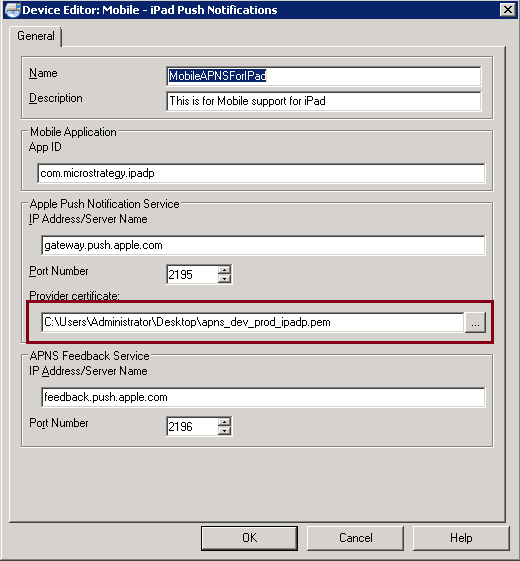
The application cannot find the gem file defined in Device Editor:
ka04W000000OdWJQA0_0EM4400000029n0.jpeg

ACTION:

  1. Make sure the pem path defined in Device Editor is correct.
  2. Check whether the user account used to start the Intelligence Server service has the permission to access the gem file. To make things simple, users can copy the gem file to the Intelligence Server folder and change the path accordingly in Device Editor.

Comment

0 comments

Details

Knowledge Article

Published:

April 13, 2017

Last Updated:

April 13, 2017