SYMPTOM
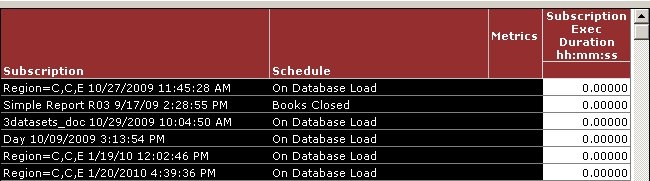
The out of the box metric "Subscription Exec Duration hh:mm:ss" available in the Strategy Enterprise Manager 9.x project returns zero values as shown below. The Strategy Enterprise Manager 9.x warehouse resides on a Microsoft SQL Server database.
CAUSE:
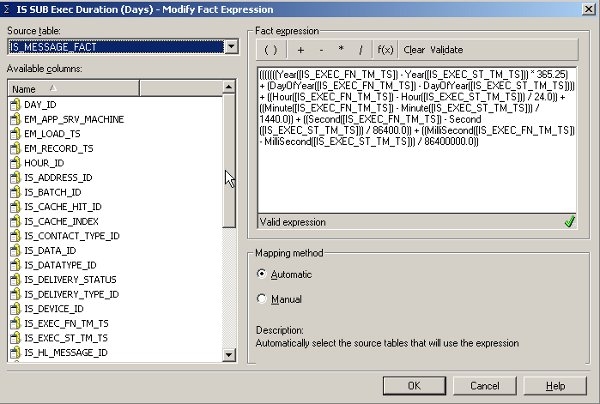
The fact used in the metric is "IS SUB Exec Duration (Days)" and is defined as shown below. The fact is defined by subtracting the execution start and finish timestamp columns. The subtraction is done individually on each extracted part (year, month, day of year, hour, minute and second) of the timestamp column. For example, the minute value is extracted from the start and finish timestamps and the difference is calculated, after which the minute value is converted to days by dividing with 1440.0.
In the SQL view of the report, the SQL for the calculation of the Subscription Exec Duration metric is as shown below. Note the SQL highlighted in bold. The extracted minutes value from the timestamp column is converted to days by dividing by 1440 and not 1440.0 i.e. the decimal is missing. The same is seen with all the other conversions i.e. the decimal is missing in the SQL view. Strategy SQL Engine ignores the decimal if there is only a zero after the decimal.
Sample Code/Error
select a11.IS_SUBS_INST_ID IS_SUBS_INST_ID,
.......
.......
sum((((((((DATEPART(YEAR, a11.IS_EXEC_FN_TM_TS) - DATEPART(YEAR, a11.IS_EXEC_ST_TM_TS)) * 365.25) + (DATEPART(DAYOFYEAR, a11.IS_EXEC_FN_TM_TS) - DATEPART(DAYOFYEAR, a11.IS_EXEC_ST_TM_TS))) + ((DATEPART(Hour, a11.IS_EXEC_FN_TM_TS) - DATEPART(Hour, a11.IS_EXEC_ST_TM_TS)) / 24)) + ((DATEPART(Minute, a11.IS_EXEC_FN_TM_TS) - DATEPART(Minute, a11.IS_EXEC_ST_TM_TS)) / 1440)) + ((DATEPART(Second, a11.IS_EXEC_FN_TM_TS) - DATEPART(Second, a11.IS_EXEC_ST_TM_TS)) / 86400)) + ((DATEPART(Millisecond, a11.IS_EXEC_FN_TM_TS) - DATEPART(Millisecond, a11.IS_EXEC_ST_TM_TS)) / 86400000))) WJXBFS1
from IS_MESSAGE_FACT a11
On SQL Server, dividing an integer value with an integer returns an integer. For example, the calculation 1/2 returns 0, where the calculation 1/2.0 returns 0.5.
Typically execution duration of a subscription is in the order of few minutes or hours. Hence, conversion of these values to days results in a value which is lesser than 1. Therefore, the metric value when calculated on SQL Server returns zeros.
ACTION
This issue was reviewed by our Technology team for feasibility and will not be scoped for a code fix in any upcoming Strategy release.
WORKAROUND
The SQL Generation Engine does not ignore the decimal if there is a non-zero value after the decimal. Modify the fact definition as given below. The change given below will not alter the metric value significantly.
(((((((Year() - Year()) * 365.25) + (DayOfYear() - DayOfYear())) + ((Hour() - Hour()) / 24.000000001)) + ((Minute() - Minute()) / 1440.000000001)) + ((Second() - Second()) / 86400.000000001)) + ((MilliSecond() - MilliSecond()) / 86400000.00001))
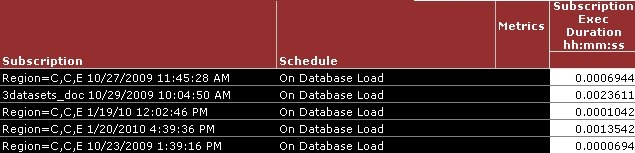
The metric values are now retrieved correctly as shown below:
32578
