EducationSoftwareStrategy.com
StrategyCommunity

Knowledge Base

Product

Community

Knowledge Base

TopicsBrowse ArticlesDeveloper Zone

Product

Download SoftwareProduct DocumentationSecurity Hub

Education

Tutorial VideosSolution GalleryEducation courses

Community

GuidelinesGrandmastersEvents
x_social-icon_white.svglinkedin_social-icon_white.svg
Strategy logoCommunity

© Strategy Inc. All Rights Reserved.

LegalTerms of UsePrivacy Policy
  1. Home
  2. Topics

KB32580: "DLL function call crashed: MAList.MAStrGetTokens" error message appears when attempting to uninstall MicroStrategy 10.x


Community Admin

• Strategy


When attempting to uninstall MicroStrategy Products 10.x from 'Add or remove programs' the following error message is displayed and the uninstall process is terminated: "DLL function call crashed: MAList.MAStrGetTokens"
SYMPTOM:
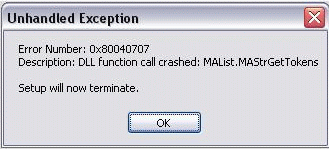
When attempting to uninstall Strategy Products 10.x from 'Add or remove programs' the following error message is displayed and the uninstall process is terminated:

ka04W000000OhaMQAS_0EM440000002HTE.gif

Error Number: 0x80040707
Description: DLL function call crashed: MAList.MAStrGetTokens
Setup will now terminate.
CAUSE:
A possible reason could be that some Strategy services are still running when the uninstall process starts (e.g. Strategy Listener).
ACTION:
Ensure that all Strategy Services are stopped from Services Window and Task Manager.


Comment

0 comments

Details

Knowledge Article

Published:

May 12, 2017

Last Updated:

May 12, 2017