EducationSoftwareStrategy.com
StrategyCommunity

Knowledge Base

Product

Community

Knowledge Base

TopicsBrowse ArticlesDeveloper Zone

Product

Download SoftwareProduct DocumentationSecurity Hub

Education

Tutorial VideosSolution GalleryEducation courses

Community

GuidelinesGrandmastersEvents
x_social-icon_white.svglinkedin_social-icon_white.svg
Strategy logoCommunity

© Strategy Inc. All Rights Reserved.

LegalTerms of UsePrivacy Policy
  1. Home
  2. Topics

KB32599: No data is returned as a result of selecting a null element as the answer for a prompt in MicroStrategy Web


Community Admin

• Strategy


This article describes an issue with null element filters in MicroStrategy

SYMPTOM:
When choosing a null element as the answer for an attribute element prompt defined in a report, Strategy Developer and Web generate different SQL. While Developer resolves the condition as "attribute ID is null," and returns a row, Web resolves the SQL as "attribute In List (''), resulting in no data returned.
 
STEPS TO REPRODUCE:

  • Create a table with two columns and populate 3 rows. Make sure that one of the cell has a null.
ka04W000000Oha2QAC_0EM440000002E9q.jpeg
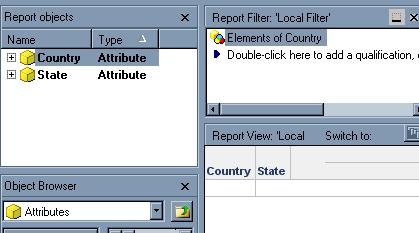
  • Create two attributes mapped to each column: Country and State. 
  • Create a report with an attribute element list prompt defined with Country. Place both Country and State in the grid.
ka04W000000Oha2QAC_0EM440000002E9Z.jpeg
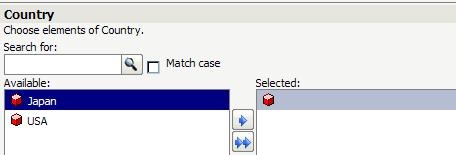
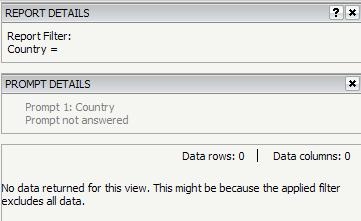
  • Execute the report in Developer and select the null element as the answer for the prompt. 
ka04W000000Oha2QAC_0EM440000002E9i.jpeg
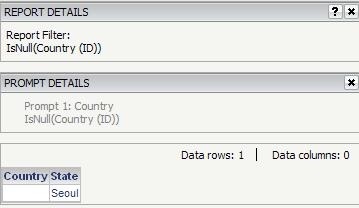
  • Confirm the following report SQL is generated and one row is returned:


    Sql

    select a11.COUNTRY COUNTRY,
    a11.STATE STATE
    from NULLTEST a11
    where a11.COUNTRY is null


ka04W000000Oha2QAC_0EM440000002E9m.jpeg
  • Execute the report in Web and select null element as the answer for the prompt as well.
ka04W000000Oha2QAC_0EM440000002E9e.jpeg
  • Confirm the following report SQL is generated and no data is returned:
     

    Sql
    select a11.COUNTRY  COUNTRY,
     a11.STATE  STATE
    from NULLTEST a11
    where a11.COUNTRY in ('')


ka04W000000Oha2QAC_0EM440000002E9o.jpeg

 
CAUSE:
This is caused by use of null attribute IDs. Null attribute IDs are not supported in Strategy and are not guaranteed to work correctly in different places.
 
ACTION:
Replace the null attribute IDs with valid values.
 
WORKAROUND 1:
Define an attribute qualification prompt and select the "Is Null" operator to qualify on the attribute.

ka04W000000Oha2QAC_0EM440000002E9k.jpeg
ka04W000000Oha2QAC_0EM440000002E9g.jpeg


Comment

0 comments

Details

Knowledge Article

Published:

May 12, 2017

Last Updated:

May 12, 2017