EducationSoftwareStrategy.com
StrategyCommunity

Knowledge Base

Product

Community

Knowledge Base

TopicsBrowse ArticlesDeveloper Zone

Product

Download SoftwareProduct DocumentationSecurity Hub

Education

Tutorial VideosSolution GalleryEducation courses

Community

GuidelinesGrandmastersEvents
x_social-icon_white.svglinkedin_social-icon_white.svg
Strategy logoCommunity

© Strategy Inc. All Rights Reserved.

LegalTerms of UsePrivacy Policy
  1. Home
  2. Topics

KB32651: "The Web application at xxx could not be found. Verify that you have typed the URL correctly" error is displayed inside a MicroStrategy 9.0.x Web Part hosted with SharePoint Portal Server 2007


Community Admin

• Strategy


The article explains what to d if a MicroStrategy Web Part is not working in SharePoint Portal Server 2007.

SYMPTOM:
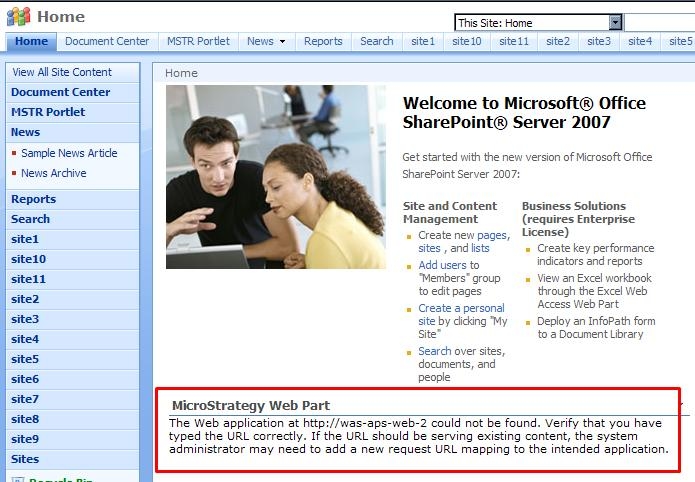
Users are unable to see Strategy reports or other pages inside a Strategy Web Part configured on a SharePoint Portal Server 2007.  The following error message is displayed:


ka04W000000OdSOQA0_0EM440000002Guo.jpeg


Sample Code/Error
The Web application at <server name> could not be found. Verify that you have typed the URL correctly. If the URL should be serving existing content, the system administrator may need to add a new request URL mapping to the intended application.
 
CAUSE:
The fully qualified name is not used for the Portal Server name, which can be found in the address bar of the browser window.
 
ACTION:
Adjust the server name to be a fully qualified name. For example,
 
Sample Code/Error
 
http://<Server_Name>.corp.microstrategy.com/Pages/default.aspx

 

ka04W000000OdSOQA0_0EM440000002Gum.jpeg


Comment

0 comments

Details

Knowledge Article

Published:

June 21, 2017

Last Updated:

June 21, 2017