EducationSoftwareStrategy.com
StrategyCommunity

Knowledge Base

Product

Community

Knowledge Base

TopicsBrowse ArticlesDeveloper Zone

Product

Download SoftwareProduct DocumentationSecurity Hub

Education

Tutorial VideosSolution GalleryEducation courses

Community

GuidelinesGrandmastersEvents
x_social-icon_white.svglinkedin_social-icon_white.svg
Strategy logoCommunity

© Strategy Inc. All Rights Reserved.

LegalTerms of UsePrivacy Policy
  1. Home
  2. Topics

KB326704: How to randomize metric values before sending Intelligent Cube/Report cache data to MicroStrategy Technical Support?


Community Admin

• Strategy


In some cases, MicroStrategy Technical Support needs to request customers to send their metadata and Intelligent Cube or Report cache data to troubleshoot issues. Some metric values in the data, however, may be confidential, and it creates difficulties for the customers to fulfill the request. This technical note will describe the steps to randomize those metric values so that the customers may be able to provide the data.

SUMMARY
In some cases, Strategy Technical Support needs to request customers to send their metadata and Intelligent Cube or Report cache data to troubleshoot issues. Some metric values in the data, however, may be confidential, and it creates difficulties for the customers to fulfill the request. This technical note will describe the steps to randomize those metric values so that the customers may be able to provide the data.
 
STEPS

  1. Suppose that Technical Support requests Intelligent Cube data/Report cache for the following report


ka04W000000Oh62QAC_0EM440000002986.jpeg


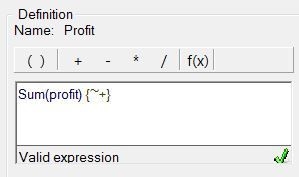
  1. The definition of the Profit metric may look as follows


ka04W000000Oh62QAC_0EM440000002983.jpeg
  1. In order to randomize the metric value, the pass-through function ApplySimple can be used along with database specific randomize function.


ka04W000000Oh62QAC_0EM440000002982.jpeg


Sum(ApplySimple("#0 * (rand() * 10)", Profit)) {~}
Notes 

  • In this example, the data warehouse is SQL Server, and the expression “rand() * 10” should return decimal values between 0.00000001 to 9.99999999
  • If other databases are used, the database’s randomize function may differ slightly and users may need to make appropriate adjustments
  • Instead of modifying the current metric, it is OK to create a new metric with the randomized function as long as the issue is still present in this new metric.


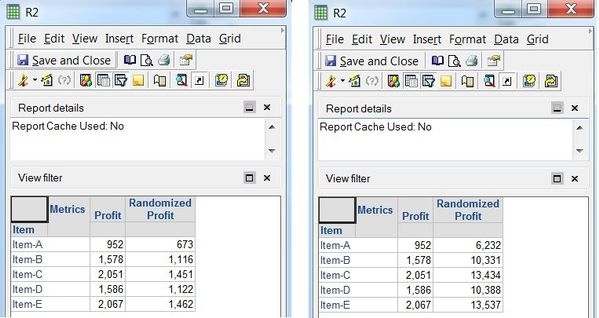
  1. After the changes, the outcome of the report should change every time users execute it.


ka04W000000Oh62QAC_0EM440000002981.jpeg
  1. Republish the Intelligent Cube or re-create a report cache, which will be shared with Strategy Technical Support
  2. Send the requested data to Strategy Technical Support
  3. Revert the metric definition back to the original one, or remove the randomized metric from the report
  4. Republish the Intelligent Cube so that it will hold non-randomized metric values i.e., the original metric's values. 

Comment

0 comments

Details

Knowledge Article

Published:

June 4, 2017

Last Updated:

June 4, 2017