EducationSoftwareStrategy.com
StrategyCommunity

Knowledge Base

Product

Community

Knowledge Base

TopicsBrowse ArticlesDeveloper Zone

Product

Download SoftwareProduct DocumentationSecurity Hub

Education

Tutorial VideosSolution GalleryEducation courses

Community

GuidelinesGrandmastersEvents
x_social-icon_white.svglinkedin_social-icon_white.svg
Strategy logoCommunity

© Strategy Inc. All Rights Reserved.

LegalTerms of UsePrivacy Policy
  1. Home
  2. Topics

KB32671: "The Web Server encountered an unknown runtime error" error message appears when attempting to connect to MicroStrategy Web 9.x


Community Admin

• Strategy


This article describes an issue when an error message "The Web Server encountered an unknown runtime error" appearing when attempting to connect to MicroStrategy Web 9.x

SYMPTOM:
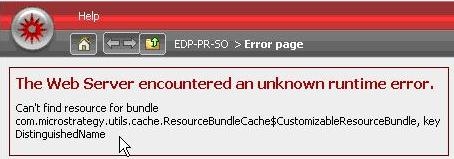
When trying to connect to Strategy Web 9.x in a Web Server cluster environment that uses Trusted Authentication, the user receives the following error message:
ka04W000000Od8SQAS_0EM440000002Guz.jpeg

Sample Code/Error


The Web Server encountered an unknown runtime error.
Can't find resource for bundle
com.Strategy.utils.cache.ResourceBundleCache$CustomizableResourceBundle, key DistinguishedName
CAUSE:
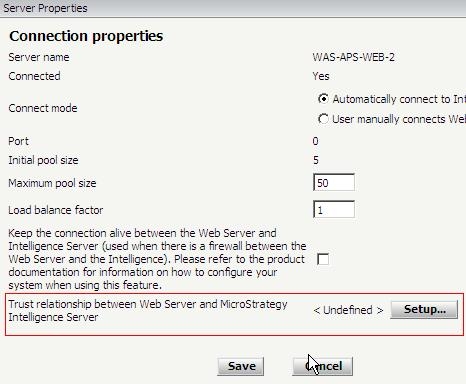
One possible cause for this issue is that the token file from one clustered Web Server was copied to the other.
ACTION:
Make sure that all the tokens are generated in the admin page of each Strategy Web Instance:

ka04W000000Od8SQAS_0EM440000002Guy.jpeg

NOTE: 
For more information on how to set up Trusted Authentication, please refer to Tech Note:
KB30292: How to setup Trusted Authentication (Single Sign On) for the MicroStrategy Intelligence Server 9


Comment

0 comments

Details

Knowledge Article

Published:

June 23, 2017

Last Updated:

June 23, 2017