EducationSoftwareStrategy.com
StrategyCommunity

Knowledge Base

Product

Community

Knowledge Base

TopicsBrowse ArticlesDeveloper Zone

Product

Download SoftwareProduct DocumentationSecurity Hub

Education

Tutorial VideosSolution GalleryEducation courses

Community

GuidelinesGrandmastersEvents
x_social-icon_white.svglinkedin_social-icon_white.svg
Strategy logoCommunity

© Strategy Inc. All Rights Reserved.

LegalTerms of UsePrivacy Policy
  1. Home
  2. Topics

KB32676: Exporting a large size report with 'Merge Column Headers' and 'Merge Row Headers' options to Excel with formatting results in corrupted data alignment with MicroStrategy Web 10.x


Community Admin

• Strategy


If a user sets ‘Merge Columns Headers’ and ‘Merge Row Headers’ options before exporting a report which has data over 20,000 cells with 'Excel with formatting' on MicroStrategy Web, report result would be found corrupted after a certain number of rows.

SYMPTOM:

If a user sets ‘Merge Columns Headers’ and ‘Merge Row Headers’ options before exporting a report which has data over 20,000 cells with 'Excel with formatting' on Strategy Web, report result would be found corrupted after a certain number of rows.
 

STEP TO REPRODUCE:

  1. Refer to the screenshot below. ‘Merge Column Headers’ and “Merge Row Headers’ options are set. This report has dataset over 20,000 cells.
ka04W000001484HQAQ_0EM44000000283i.jpeg
  • Export this report with 'Excel with formatting' and save.
  • Open the saved file and notice that the report result at the beginning exported correctly.
ka04W000001484HQAQ_0EM44000000283V.jpeg
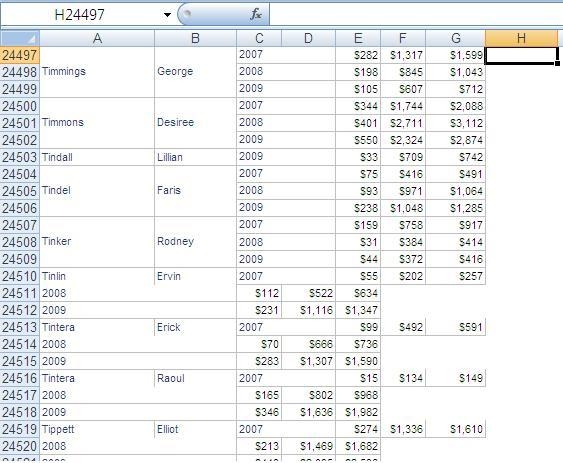
  • However, after scrolling down to the bottom, values stored in improper cells start appearing.
ka04W000001484HQAQ_0EM44000000283T.jpeg
  • ​​​​​​​


CAUSE:

There is a limit for the number of merged cells. If the number of merged cells is less than the limit, the issue is not seen; but if the number of merged cells is larger than the limit, the row or column spans of the excess part of merged cells cannot be rendered correctly, and the issue appears. This limitation is on the Microsoft Excel side.
 

ACTION:

To avoid this issue, please reduce the number of merged cells, like unmerging row headers, unmerging column headers or removing extra columns.


Comment

0 comments

Details

Knowledge Article

Published:

June 9, 2017

Last Updated:

June 9, 2017