EducationSoftwareStrategy.com
StrategyCommunity

Knowledge Base

Product

Community

Knowledge Base

TopicsBrowse ArticlesDeveloper Zone

Product

Download SoftwareProduct DocumentationSecurity Hub

Education

Tutorial VideosSolution GalleryEducation courses

Community

GuidelinesGrandmastersEvents
x_social-icon_white.svglinkedin_social-icon_white.svg
Strategy logoCommunity

© Strategy Inc. All Rights Reserved.

LegalTerms of UsePrivacy Policy
  1. Home
  2. Topics

KB32678: How to keep Null attribute values as blank and Null metric values as zero in grid report in MicroStrategy Developer 10.x


Stefan Zepeda

Salesforce Solutions Architect • Strategy


KB32678: How to keep Null attribute values as blank and Null metric values as zero in grid report in MicroStrategy Developer 10.x

When a grid report contains Null attribute values and Null metric values, all Null values will display as blank by default as shown below:
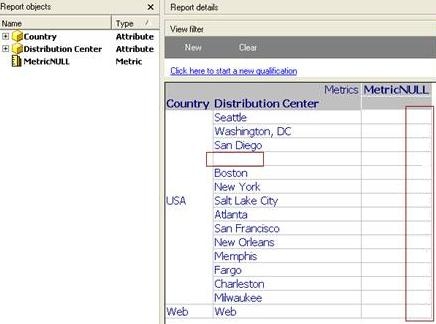
 

ka02R000000kUmkQAE_0EM440000002E90.jpeg

 
Follow the steps below to display Null attribute values as blank and Null metric values as zero in a Strategy report:
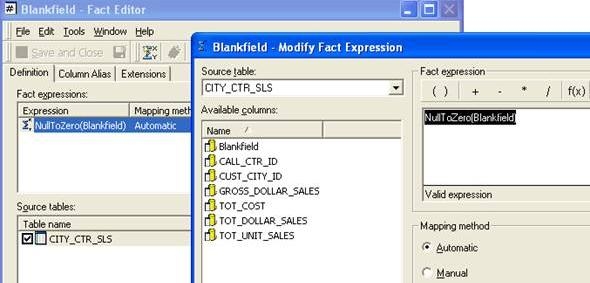
 

  1. Modify the expression of the fact (that is used in the report metric expression) to: NullToZero(Blankfield):
ka02R000000kUmkQAE_0EM440000002E8y.jpeg


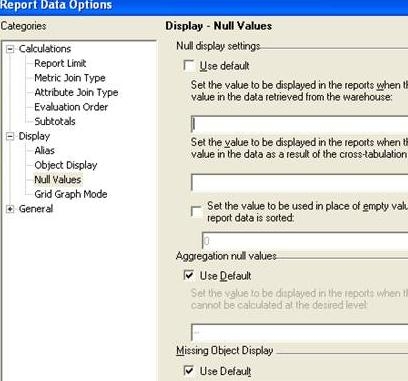
  • In Report Data Options > Display > Null values display settings, leave all default settings:
ka02R000000kUmkQAE_0EM440000002E8n.jpeg


  • In the report, Null attribute values will display as blank and Null metric values as zero:
ka02R000000kUmkQAE_0EM440000002E91.jpeg


Comment

0 comments

Details

Knowledge Article

Published:

June 2, 2017

Last Updated:

June 2, 2017