EducationSoftwareStrategy.com
StrategyCommunity

Knowledge Base

Product

Community

Knowledge Base

TopicsBrowse ArticlesDeveloper Zone

Product

Download SoftwareProduct DocumentationSecurity Hub

Education

Tutorial VideosSolution GalleryEducation courses

Community

GuidelinesGrandmastersEvents
x_social-icon_white.svglinkedin_social-icon_white.svg
Strategy logoCommunity

© Strategy Inc. All Rights Reserved.

LegalTerms of UsePrivacy Policy
  1. Home
  2. Topics

KB32680: How do Custom Colors render in a Pie Chart in MicroStrategy?


Stefan Zepeda

Salesforce Solutions Architect • Strategy


When creating a Pie Chart it may necessary to order the colors that appear in the chart to meet the reporting requirement.

SYMPTOM:
When creating a Pie Chart it may necessary to order the colors that appear in the chart to meet the reporting requirement.
 
ACTION:
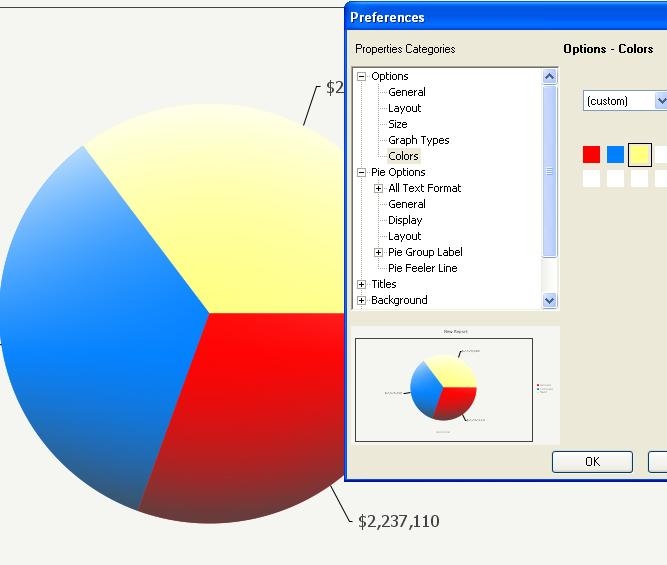
The Pie Chart will use the colors that appear in the Custom Color editor from right to left. The graph will start rendering the colors at the graph segment that with the segment that contains the top most point in the circle and go counter-clockwise.
ka02R000000kc70QAA_0EM440000002E6B.jpeg


Comment

0 comments

Details

Knowledge Article

Published:

May 26, 2017

Last Updated:

May 26, 2017